
We are very pleased to announce an important piece of news: credativ GmbH is now a certified training partner of Proxmox Server Solutions GmbH. This expands our many years of Proxmox expertise with an official training offering – delivered by our certified trainers, with a certificate of participation directly from Proxmox.
(more…)Proxmox VE® has established itself as an open-source virtualization platform, but even experienced IT administrators encounter treacherous pitfalls during cluster configuration. A single Proxmox® cluster error can cripple your entire enterprise infrastructure and lead to costly downtime. The good news: most of these problems are predictable and avoidable.
From split-brain scenarios to flawed backup strategies – these ten most common virtualization errors have caused countless IT projects to fail. Learn how to avoid these critical stumbling blocks and elevate your Proxmox® cluster management to a professional level. (more…)
Proxmox® installation is a crucial step for companies looking to implement a professional virtualization solution. This comprehensive guide will walk you through the entire Proxmox VE installation process and help you set up a stable hypervisor environment. You will need basic Linux® knowledge and approximately 2–3 hours for the complete installation and basic configuration. For this Proxmox guide, you will need a dedicated server with at least 4 GB RAM, an 8 GB USB stick, and access to the target computer’s BIOS. After completing these steps, you will have a fully functional Proxmox VE system for your server virtualization. Please note, however, that this hardware configuration is far too limited for a production system. For initial steps, however, it is suitable. (more…)
Proxmox® offers four storage options: ZFS for local high-performance storage with integrated snapshots and compression, Ceph for distributed high-availability systems, NFS for file-based network storage, and iSCSI for block-based enterprise solutions. The choice depends on your performance requirements, budget, and infrastructure size. Each option is suitable for specific virtualization scenarios.
(more…)The decision for credativ Proxmox Enterprise Support depends on your business requirements, the criticality of your virtualization environment, and your available internal IT resources. Enterprise Support offers professional assistance, stable updates, and advanced features, while the Community Edition remains free but without guaranteed support. This analysis will help you make the right decision for your company.
What is Proxmox Enterprise Support and how does it differ from the Community Edition?
Proxmox Enterprise Support is the paid version of the virtualization platform, offering professional support, stable updates, and access to enterprise repositories. The community repositories provide the same basic functionality for free, but without a support guarantee and with less thoroughly tested updates. Both versions are provided by Proxmox Server Solutions GmbH under the AGPL license. However, there is an important additional distinction: those who wish to save costs can gain access to the enterprise repositories by purchasing a so-called Community Subscription. This, however, only includes access and no further support.
The most significant difference lies in the support level. Enterprise customers receive direct access to the Proxmox team for technical issues, while community users rely on forums and community assistance. Enterprise Support includes various service levels, from Standard to Premium, with different response times.
The update cycles differ significantly. Enterprise repositories contain thoroughly tested, stable updates optimized for production environments. Community updates appear more frequently but are less intensively tested and can be more unstable.
Additional enterprise features include advanced backup options, cluster management tools, and specialized monitoring options. These features are not available in the Community Edition and are specifically tailored to enterprise requirements.
When is Proxmox Enterprise Support worthwhile for businesses?
Enterprise Support is particularly worthwhile for companies with critical production environments, limited internal IT resources, or strict compliance requirements. Companies with approximately 50 employees or more, or those with high availability demands, generally benefit from professional support.
A critical factor is the availability requirements of your systems. If outages cause high costs or significantly disrupt business processes, investing in Enterprise Support is justified. This applies particularly to e-commerce, financial service providers, or manufacturing operations.
Internal IT expertise plays a crucial role. If specialized virtualization experts are lacking in the team, Enterprise Support provides valuable assistance with complex problems. Smaller IT teams particularly benefit from the available expertise.
Compliance requirements may necessitate Enterprise Support. Many industries require documented support for audit purposes. Enterprise Support provides the necessary documentation and traceability for regulated environments.
What does Proxmox Enterprise Support cost and what licensing models are available?
Proxmox Enterprise Support is licensed per CPU socket with various support levels. Prices start at 120 Euros per socket per year for access to the enterprise repositories without support, while Premium Support incurs significantly higher costs but offers faster response times. (As of January 1, 2026)
The Basic or Standard package includes access to enterprise repositories, updates, and email support during business hours. This level is suitable for smaller environments without particularly high availability requirements.
Premium Support offers shorter response times and extended services. The costs are significantly higher, but for critical systems, they are well justified by minimized downtime.
Additional cost factors include the number of CPU sockets, desired response times, and special services such as on-site support or individual training. Larger deployments often receive volume discounts.
What alternatives are there to Proxmox Enterprise Support?
Alternatives to official Enterprise Support include Community Support, third-party service providers, in-house expertise development, or hybrid approaches. Each option offers different advantages and disadvantages depending on the company’s situation.
Community support via forums and documentation remains free but offers no guarantees for response times or problem resolution. Experienced IT teams can often find solutions independently, while less experienced teams may struggle.
Support from specialized third-party providers like credativ GmbH can be more cost-effective than official Enterprise Support. These providers often understand local requirements better and offer more flexible service packages. However, quality varies among providers.
Developing in-house expertise through training and certifications offers long-term independence but requires investment in personnel and time. Hybrid approaches combine internal expertise with external open-source support for particularly complex problems.
How credativ® helps with Proxmox decisions and support
credativ® supports you in the strategic decision for the appropriate Proxmox support strategy and offers comprehensive technical support for your virtualization environment. As a vendor-independent open-source specialist, we analyze your requirements and develop tailored support concepts.
Our Proxmox services include:
- Needs analysis and support strategy consulting for your virtualization environment
- 24/7 technical support with direct access to Linux and virtualization experts
- Optional: Proactive monitoring and maintenance of your Proxmox clusters
- Migration and implementation of Proxmox solutions
- Training and knowledge transfer for your IT teams
- Hybrid support models as an alternative to pure Enterprise Support
With over 25 years of experience in the open-source sector, we offer you the security of professional support without vendor lock-in. Contact us for a free consultation on your optimal Proxmox support strategy.
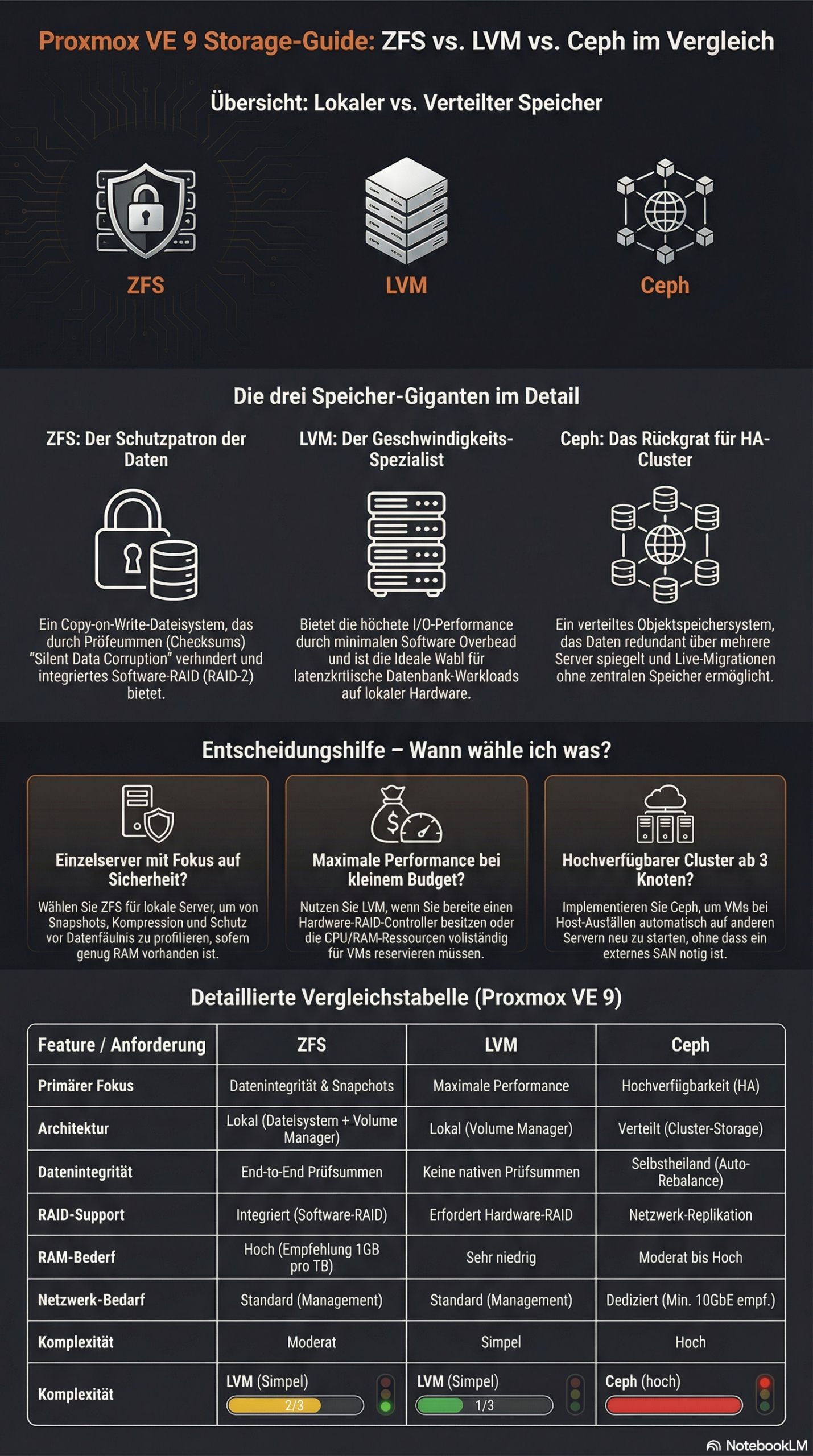
The choice between ZFS, LVM, and Ceph in Proxmox depends on your specific requirements. ZFS offers integrated data redundancy and snapshots for local systems, LVM enables flexible volume management with high performance, while Ceph provides distributed storage solutions for cluster environments. Each technology has different strengths in terms of performance, scalability, and maintenance effort.
What is the difference between ZFS, LVM, and Ceph in Proxmox?
ZFS is a copy-on-write file system with integrated volume management and data redundancy. It combines a file system and volume manager into one solution and offers features such as snapshots, compression, and automatic error correction. ZFS is particularly suitable for local storage scenarios with high data integrity requirements.
LVM (Logical Volume Manager)
Ceph represents a fully distributed storage architecture that replicates data across multiple nodes. It provides object, block, and file storage in a single system and scales horizontally. Ceph is suitable for large cluster environments with high availability requirements.
Which storage solution offers the best performance for different workloads?
LVM with ext4 or XFS delivers the highest performance for I/O-intensive applications such as databases. The low overhead makes it the first choice for latency-critical workloads. ZFS follows with good performance alongside data integrity features, while Ceph exhibits higher latency due to network overhead.
For database workloads, LVM with fast SSDs and direct access is recommended. The minimal abstraction layer reduces latency and maximizes IOPS. ZFS can offer competitive performance here through ARC cache and L2ARC acceleration, especially for read-heavy workloads.
File services benefit from ZFS features such as deduplication and compression, which save storage space.
Ceph is suitable for distributed file services with high availability requirements, even if performance is limited by network communication. Here, virtual machines can be migrated from host to host with virtually no delay, whether using a tool like ProxLB or in the event of a failover.
Virtual machines run well on all three systems. LVM offers the best raw performance, ZFS enables efficient VM snapshots, and Ceph provides live migration between hosts without shared storage.
| Feature | LVM | ZFS | Ceph |
|---|---|---|---|
| Architecture Type | Local (Block Storage) | Local (File System & Volume Manager) | Distributed (Object/Block/File) |
| Performance (Latency) | Excellent (Minimal Overhead) | Good (Scales with RAM/ARC) | Moderate (Network Dependent) |
| Snapshots | Yes | Yes (very efficient) | Yes |
| Data Integrity | Limited (RAID-dependent) | Excellent (Checksumming) | Excellent (Checksumming) |
| Scalability | Limited (Single Node) | Medium (within host) | Very high (Horizontal in cluster) |
| Network Requirements | Standard (1 GbE sufficient) | Standard (1 GbE sufficient) | High (min. 10-25 GbE recommended) |
| Main Application Area | Maximum single-node performance | High data security & local speed | Enterprise cluster & high availability |
| Complexity | Simple | Moderate | High |
How do you decide between local and distributed storage architecture?
Local storage solutions such as ZFS and LVM are suitable for single-host environments or when maximum performance is more important than high availability. Distributed systems like Ceph are necessary when data must be available across multiple hosts or when automatic failover mechanisms are required.
Infrastructure size plays a decisive role. Individual Proxmox hosts or small setups with two to three servers work well with local storage solutions. From three to four hosts, Ceph becomes interesting as it enables true high availability without a single point of failure. Ceph requires a quorum, so an odd number of nodes is always required for Ceph. Cluster setups with an even number are therefore always subject to some variation in usage – but manual adjustments are also required in Proxmox VE here.
Network requirements differ significantly. Local storage systems only require a standard network for management, while Ceph requires dedicated 10GbE connections for optimal performance. Today, for certain performance needs, 25GbE connections are preferred for the data load. Ideally, these connections are available exclusively to the Ceph system and are in addition to the virtualization requirements. The network infrastructure therefore significantly influences the storage decision.
Maintenance effort and complexity increase with distributed systems. ZFS and LVM are easier to understand and maintain, while Ceph requires specialized knowledge for configuration, monitoring, and troubleshooting.
Proxmox VE with ZFS offers a middle ground between true shared storage and local data storage with pe-sync. This allows hosts to be kept in sync automatically. However, this is not synchronous but occurs at specific intervals, such as every 15 minutes. For certain workloads, this can be perfectly sufficient.
What are the most important factors in Proxmox storage planning?
Hardware requirements vary greatly between storage technologies. ZFS requires sufficient RAM (1 GB per TB of storage) so that the integrated ARC cache can reach its full performance, LVM runs on minimal hardware, and Ceph requires dedicated network hardware, as well as sufficient RAM and multiple hosts. Hardware equipment often determines the available storage options.
Backup strategies must match the chosen storage solution. ZFS snapshots enable efficient incremental backups, LVM snapshots offer similar functionality, while Ceph backups are implemented via RBD snapshots or external tools. Backup requirements significantly influence the choice of storage.
Scalability planning should take future growth into account. LVM allows for easy volume expansion, ZFS pools can be expanded with additional drives, and Ceph scales by adding new hosts. The planned growth direction influences the optimal storage architecture.
Budget considerations include not only hardware costs but also maintenance effort and the required expertise. Simple LVM setups have low total costs, while Ceph clusters require higher investments in hardware and training.
Bonus: ZFS and Ceph both offer integrated checksumming procedures that actively help against so-called "bit rot" – creeping data corruption – and can automatically detect and correct it through redundancy. LVM without additional layers like a RAID layer does not allow for this.
How credativ® supports Proxmox storage optimization
credativ® offers comprehensive consulting and implementation for optimal Proxmox storage decisions based on your specific requirements. Our open-source experts analyze your workloads, infrastructure, and growth plans to recommend the ideal storage architecture.
Our services include:
- Detailed storage architecture assessment and technology selection
- Professional implementation and configuration of ZFS, LVM, or Ceph
- Performance optimization and monitoring setup for selected storage solutions
- 24/7 support and maintenance for production Proxmox environments
- Training for your IT team on storage management and best practices
With over 25 years of experience in the open-source sector and direct access to our permanent Linux specialists, you receive professional Proxmox support without going through call centers. Contact us for a personalized consultation on your Proxmox storage strategy and benefit from our proven enterprise support.
A stable Proxmox® cluster requires precise Corosync configuration for reliable cluster communication. This guide shows you how to optimally set up your Proxmox® cluster network and correctly configure Corosync. The usual process for system administrators with basic Proxmox® VE knowledge is correctly set up by the automatic installer or in the Proxmox VE frontend, requiring no manual work.
We explicitly advise against working on the configuration without deep knowledge of Corosync’s intricacies and the consequences of custom settings. This should be left to specialists with expertise. However, this overview may be helpful for experimentation and further education. (more…)
Proxmox® system requirements vary significantly depending on the deployment scenario. For a basic installation, you need at least a 64-bit CPU with virtualization support, 2 GB of RAM, and 32 GB of storage space. However, production environments require considerably more resources, depending on the number of virtual machines and their workloads. Correct hardware sizing determines the performance and stability of your Proxmox infrastructure.
(more…)
After the successful kick-off in December, we are now moving into the second round! On March 5th, we invite you again to the Open Source Virtualization Gathering at our premises in Mönchengladbach.
As last time, the focus is on professional exchange in a relaxed atmosphere. We have slightly streamlined the schedule to create more room for the talks. We look forward to two high-caliber talks that will demonstrate the versatility of open-source virtualization in practice.
The schedule for the evening
This time, we will start the program a little earlier:
- 5:15 PM: Admission and arrival – Cold drinks are on us!
- 5:30 PM: Talk #1 – Efficient Proxmox Cluster Management with PegaProx
- Speaker: Florian Paul Azim Hoberg @gyptazy
- 6:15 PM: Socializing & short break
- 18:30 Uhr: Talk #2 – 5G Mobile Private Networks auf Proxmox
- Speaker: Sven Lankes, COCUS AG
- 7:15 PM: Open discussion / Socializing in the office with drinks
- 8:30 PM: Joint conclusion at the Italian restaurant (directly in the building, at your own expense)
The first talk: Proxmox management in-depth
The kick-off will be given by Florian Hoberg (gyptazy), Technical Lead for Virtualization at credativ and developer of well-known open-source tools such as ProxLB.
He will introduce PegaProx – a management platform specifically developed for Proxmox clusters. Florian will demonstrate how PegaProx goes beyond the functionality of the official Proxmox Datacenter Manager and will show in a live demo how it can be used to centrally and efficiently manage complex multi-node environments.
The second talk: High-Tech Connectivity meets Open Source
Wir freuen uns sehr, für den zweiten Slot Sven Lankes von der COCUS AG gewonnen zu haben. Sven hilft Kunden seit über 25 Jahren, ihre IT-Systeme sicher und effizient umzusetzen, und ist seit zwei Jahrzehnten aktiv in diversen Open-Source-Communities.
Die COCUS AG liefert schlüsselfertige 5G Mobile Private Networks (Campus-Netze), die die Connectivity-Möglichkeiten von Unternehmen massiv erweitern. In seinem Vortrag “5G Mobile Private Networks auf Proxmox”gibt Sven zunächst einen generellen Überblick über diese Technologie. Im Anschluss geht er auf die Besonderheiten bei Entwicklung, Wartung und Deployment der hauseigenen “Campus-To-Go Solution” ein und zeigt, wie sie dafür Proxmox-Virtualisierung erfolgreich mit modernen Cloud-Technologien verbinden.
Catering & Registration
During the event in the office, we will provide you with cold drinks. For later hunger, we will move together at 8:30 PM to the Italian restaurant on the ground floor (important note: they do not serve pizza there, but excellent pasta and other dishes). Dinner is at your own expense.
Please register via Luma so that we can coordinate the drink planning and the reservation at the Italian restaurant: 👉 https://luma.com/dmphypvn If you do not wish to use an external service, you can also simply contact us by email.
We look forward to seeing you!
ProxCLMC – What is it?
Live migration is one of the most powerful and frequently used functions in a Proxmox VE Cluster. However, it presupposes a requirement that is often underestimated: consistent CPU compatibility across all nodes. In real-world environments, clusters rarely consist of identical hardware where you could simply use the CPU type host. Nodes are added over time, CPU generations differ, and functional scopes continue to evolve. Although Proxmox VE allows a flexible CPU configuration, determining a safe and optimal CPU baseline for the entire cluster has so far been largely a manual and experience-based task.

ProxCLMC (Prox CPU Live Migration Checker) was developed by our colleague Florian Paul Azim Hoberg (also known as gyptazy) in Rust as an open-source solution under the GPLv3 license to close this gap in a simple, automated, and reproducible way. The tool examines all nodes of a Proxmox VE cluster, subsequently analyzes their CPU capabilities, and calculates the highest possible CPU compatibility level supported by each node. Instead of relying on assumptions, spreadsheets, or trial and error, administrators receive a clear and deterministic result that can be used directly when selecting VM CPU models.
Comparable mechanisms already exist in other virtualization ecosystems. Enterprise platforms often offer integrated tools or automatic assistance to detect compatible CPU baselines and prevent invalid live migration configurations. Proxmox VE currently does not have such an automated detection mechanism, so administrators must manually compare CPU flags or rely on operational experience. ProxCLMC closes this gap by providing a cluster-wide CPU compatibility analysis specifically tailored to Proxmox environments.
How does ProxCLMC work?
ProxCLMC is designed to integrate seamlessly into existing Proxmox VE clusters without requiring additional services, agents, or configuration changes. It is written entirely in Rust (fully open source under GPLv3), compiled as a static binary, and provided as a Debian package via the gyptazy repository to facilitate easy installation. The workflow follows a clear and transparent process that reflects how administrators think about CPU compatibility but automates it reliably and reproducibly.
After starting, the tool parses the local corosync.conf on the node on which it is running. This allows ProxCLMC to automatically detect all members of the cluster without relying on external inventories or manual input. The determined node list thus always corresponds to the actual state of the cluster.
Once all cluster nodes are identified, ProxCLMC establishes an SSH connection to each node. Via this connection, it remotely reads the content of /proc/cpuinfo. This file provides a detailed and authoritative view of the CPU capabilities provided by the host kernel, including the complete set of supported CPU flags.
From the collected data, ProxCLMC extracts the relevant CPU flags and evaluates them based on clearly defined x86-64 CPU baseline definitions. These baselines are directly based on the CPU models supported by Proxmox VE and QEMU, including:
- x86-64-v1
- x86-64-v2-AES
- x86-64-v3
- x86-64-v4
By mapping the CPU flags of each node to these standardized baselines, ProxCLMC can determine which CPU levels are supported per node. The tool then calculates the lowest common CPU type shared by all nodes in the cluster. This resulting baseline represents the maximum CPU compatibility level that can be safely used for virtual machines while still allowing unrestricted live migrations between all nodes. To get a general idea of the output:
 test-pmx01 | 10.10.10.21 | x86-64-v3
 test-pmx02 | 10.10.10.22 | x86-64-v3
 test-pmx03 | 10.10.10.23 | x86-64-v4
 Cluster CPU type: x86-64-v3
With this approach, ProxCLMC brings automated CPU compatibility checking to Proxmox VE-based clusters. Comparable concepts are already known from other virtualization platforms, such as VMware EVC, where CPU compatibility is enforced cluster-wide to ensure secure migrations. ProxCLMC transfers this basic idea to Proxmox environments but implements it in a lightweight, transparent, and completely open manner, thus integrating seamlessly into existing operating procedures and workflows.
Installation of ProxCLMC
ProxCLMC was developed with the goal of enabling easy deployment and integrating cleanly into existing Proxmox VE environments. It can be used directly from the source code or installed as a packaged Debian binary, making it suitable for both development and production environments.
The complete source code is publicly available on GitHub and can be accessed at the following address:
https://github.com/gyptazy/ProxCLMC
This enables complete transparency, auditability, and the ability to adapt or build the tool to individual requirements.
Prerequisites and Dependencies
Before installing ProxCLMC, the following prerequisites must be met:
- A Proxmox VE cluster
- SSH authentication between all Proxmox VE nodes
- Network connection between all cluster members
ProxCLMC uses SSH to remotely examine each node and read CPU information. Passwordless SSH authentication is therefore recommended to ensure smooth and automated execution.
Installation via the Debian Repository
The recommended way to install ProxCLMC on Debian-based systems, including Proxmox VE, is via the Debian repository provided by gyptazy. This repository is also used to distribute the ProxLB project and integrates seamlessly into the usual package management workflows.
To add the repository and install ProxCLMC, execute the following commands:
Using the repository ensures that ProxCLMC can be easily installed, updated, and managed together with other system packages.
Installation via a Debian Package
Alternatively, ProxCLMC can also be installed manually via a pre-built Debian package. This is particularly useful for environments without direct repository access or for offline installations.
The package can be downloaded directly from the gyptazy CDN and installed with dpkg:
This method offers the same functionality as installation via the repository, but without automatic updates.
Conclusion
ProxCLMC exemplifies how quickly gaps in the open-source virtualization ecosystem can be closed when real operational requirements are directly addressed. Similar to the ProxLB project (GitHub), which provides advanced scheduling and balancing functions for Proxmox VE-based clusters, ProxCLMC focuses on a very specific but critical area that was previously largely left to manual processes and experience.
By introducing automated CPU compatibility detection, ProxCLMC brings a functionality to Proxmox VE clusters that is commonly expected in enterprise virtualization platforms but has not yet been available in automated form. It shows that open-source solutions are not limited by missing functions but rather offer the freedom to extend and adapt platforms exactly where it is most important.
With ProxCLMC, operators can now automatically determine the most suitable CPU type for virtual machines in a Proxmox VE cluster, ensuring secure live migrations and consistent behavior across all nodes. Together with projects like ProxLB, this underscores the strength of the open-source model: missing enterprise functions can be transparently added, adapted to real requirements, and shared with the community to continuously improve the Proxmox ecosystem. Should you also require further adjustments or developments around or for Proxmox VE, we would be happy to support you in the realization! Do not hesitate to contact us – we would be happy to advise you on your project!
Review of the Dutch Proxmox Day 2025
On September 25, 2025, we attended the Dutch Proxmox Day 2025 in Ede (Netherlands) – and I must say: the event was a complete success. Organized by Tuxis B.V. at the Hotel Belmont in the Veluwe region, the day offered an excellent mix of expert presentations and valuable exchange.
Thanks to the Hosts
A heartfelt thank you to the Tuxis team: For the invitation as a speaker, for the trust placed in us, and for the perfect organization. Yes — this blog article is coming a bit late, but as they say: better late than never.

My Perspective as a Speaker
As a speaker, I had the pleasure of being part of an exciting program. At the same time, I was a participant: both at the same time – that’s what makes such days special. I would like to highlight a few presentations:
- Aaron Lauterer (Linux Software Developer at Proxmox Server Solutions) – “Let’s get technical with a Proxmox developer”: A look at upcoming features of Proxmox VE. The upcoming integration of OCI containers (aka Docker) is particularly exciting.
- Rob Turk (Senior Presales Systems Engineer at Veeam) – “Save the data”: Clearly shows that Proxmox has now arrived in the enterprise world.
- Mark Schouten (CTO at Tuxis) – “Cool stuff you can do with Proxmox”: Proxmox Backup Server in interaction with ZFS, how to make the whole thing more performant and what unexpected problems with SCSI and Western Digital have occurred, Mark Schouten told us about it
- Alexander Wirt – “Balancing workloads in Proxmox”: My own contribution with a focus on the project ProxLB of my esteemed colleague Florian Hoberg, which distributes virtual machines evenly across nodes, again shows the advantages and OSS and open interfaces. These make it easy to add missing functionality and thus compete with the industry giants.
- Robbe Van Herck (Support & Maintenance Engineer at International Polar Foundation) – “Proxmox on Antarctica”: Proxmox in extreme use – at the other end of the world and very far from everyday data center life. Robbe was able to show well that Proxmox also works in the most remote corners of the earth, the other challenges are more exciting here – such as hardware that is overwhelmed by the low temperatures.
- Han Wessels (Operations System Engineer at ESA) – “Challenged to run Proxmox out of this world”: Why Proxmox can also be operated on the ISS or in space – technology meets vision. Han vividly described the challenges that arise, such as the vibration during the launch of the carrier rocket or the radiation that significantly shortens the lifespan of storage.
I was able to take away many impulses – both technically and ideally. And I had good conversations that will certainly pay off further.
Networking & Exchange
The informal part was just as valuable as the program: during the breaks, at lunch or at the get-together in the afternoon, we made new contacts, gained interesting insights and met old acquaintances. It is precisely these moments that make a conference come alive.
Outlook
We are already looking forward to next year. When the Tuxis team calls again, we will be happy to be there again. Many thanks again to all those involved, all speakers and all participants – see you again. In between, this December there will be the first Open Source Virtualization Gathering at our company.
Efficient Storage Automation in Proxmox with the proxmox_storage Module
Managing various storage systems in Proxmox environments often involves recurring tasks. Whether it’s creating new storage, connecting NFS, CIFS shares, iSCSI, or integrating more complex backends like CephFS or Proxmox Backup Server, in larger environments with multiple nodes or entire clusters, this can quickly become time-consuming, error-prone, and difficult to track.
With Ansible, these processes can be efficiently automated and standardized. Instead of manual configurations, Infrastructure as Code ensures a clear structure, reproducibility, and traceability of all changes. Similar to the relatively new module proxmox_cluster, which automates the creation and joining of Proxmox nodes to clusters, this now applies analogously to storage systems. This is precisely where the Ansible module proxmox_storage, developed by our highly esteemed colleague Florian Paul Azim Hoberg (also well-known in the open-source community as gyptazy), comes into play. It enables the simple and flexible integration of various storage types directly into Proxmox nodes and clusters, automated, consistent, and repeatable at any time. The module is already part of the Ansible Community.Proxmox Collections and has been included in the collections since version 1.3.0.
This makes storage management in Proxmox not only faster and more secure, but also seamlessly integrates into modern automation workflows.
Ansible Module: proxmox_storage
The proxmox_storage module is an Ansible module developed in-house at credativ for the automated management of storage in Proxmox VE. It supports various storage types such as NFS, CIFS, iSCSI, CephFS, and Proxmox Backup Server.
The module allows you to create new storage resources, adjust existing configurations, and completely automate the removal of no longer needed storage. Its integration into Ansible Playbooks enables idempotent and reproducible storage management in Proxmox nodes and clusters. The module simplifies complex configurations and reduces sources of error that can occur during manual setup.
Add iSCSI Storage
Integrating iSCSI storage into Proxmox enables centralized access to block-based storage that can be flexibly used by multiple nodes in the cluster. By using the proxmox_storage module, the connection can be configured automatically and consistently, which saves time and prevents errors during manual setup.
- name: Add iSCSI storage to Proxmox VE Cluster
  community.proxmox.proxmox_storage:
  api_host: proxmoxhost
  api_user: root@pam
  api_password: password123
  validate_certs: false
  nodes: ["de-cgn01-virt01", "de-cgn01-virt02", "de-cgn01-virt03"]
  state: present
  type: iscsi
  name: net-iscsi01
  iscsi_options:
  portal: 10.10.10.94
  target: "iqn.2005-10.org.freenas.ctl:s01-isci01"
  content: ["rootdir", "images"]
The integration takes place within a single task, where the consuming nodes and the iSCSI-relevant information are defined. It is also possible to define for which “content” this storage should be used.
Add Proxmox Backup Server
The Proxmox Backup Server (PBS) is also considered storage in Proxmox VE and can therefore be integrated into the environment just like other storage types. With the proxmox_storage module, a PBS can be easily integrated into individual nodes or entire clusters, making backups available centrally, consistently, and automatically.
- name: Add PBS storage to Proxmox VE Cluster
  community.proxmox.proxmox_storage:
  api_host: proxmoxhost
  api_user: root@pam
  api_password: password123
  validate_certs: false
  nodes: ["de-cgn01-virt01", "de-cgn01-virt02"]
  state: present
  name: backup-backupserver01
  type: pbs
  pbs_options:
  server: proxmox-backup-server.example.com
  username: backup@pbs
  password: password123
  datastore: backup
  fingerprint: "F3:04:D2:C1:33:B7:35:B9:88:D8:7A:24:85:21:DC:75:EE:7C:A5:2A:55:2D:99:38:6B:48:5E:CA:0D:E3:FE:66"
  export: "/mnt/storage01/b01pbs01"
  content: ["backup"]
Note: It is important to consider the fingerprint of the Proxmox Backup Server system that needs to be defined. This is always relevant if the instance’s associated certificate was not issued by a trusted root CA. If you are using and legitimizing your own root CA, this definition is not necessary. .
Remove Storage
No longer needed or outdated storage can be removed just as easily from Proxmox VE. With the proxmox_storage module, this process is automated and performed idempotently, ensuring that the cluster configuration remains consistent and unused resources are cleanly removed. A particular advantage is evident during storage migrations, as old storage can be removed in a controlled manner after successful data transfer. This way, environments can be gradually modernized without manual intervention or unnecessary configuration remnants remaining in the cluster.
- name: Remove storage from Proxmox VE Cluster
  community.proxmox.proxmox_storage:
  api_host: proxmoxhost
  api_user: root@pam
  api_password: password123
  validate_certs: false
  state: absent
  name: net-nfsshare01
  type: nfs
Conclusion
The example of automated storage integration with Ansible and Proxmox impressively demonstrates the advantages and extensibility of open-source solutions. Open-source products like Proxmox VE and Ansible can be flexibly combined, offering an enormous range of applications that also prove their worth in enterprise environments.
A decisive advantage is the independence from individual manufacturers, meaning companies do not have to fear vendor lock-in and retain more design freedom in the long term. At the same time, it becomes clear that the successful implementation of such scenarios requires sound knowledge and experience to optimally leverage the possibilities of open source.
While this only covers a partial area, our colleague Florian Paul Azim Hoberg (gyptazy) impressively demonstrates here in his video “Proxmox Cluster Fully Automated: Cluster Creation, NetApp Storage & SDN Networking with Ansible” what full automation with Proxmox can look like.
This is precisely where we stand by your side as your partner and are happy to support you in the areas of automation, development and all questions relating to Proxmox and modern infrastructures. Please do not hesitate to contact us – we will be happy to advise you!