
The credativ PostgreSQL® Appliance is now available for download as a completely free Open Source solution. The new appliance called ‘Elephant Shed PostgreSQL® Appliance‘ offers a tremendous ease of use for enterprise PostgreSQL® operations. The long-term maintenance of the appliance will be handled by the PostgreSQL® experts of credativ. Prepared images for the major cloud and virtualization platforms are already in work and will be released soon for VMWare, Virtualbox, Vagrant and for the cloud platforms Microsoft Azure, Amazon Web Services and Google Cloud Platform.
Elephant Shed builds on proven components, which are published exclusively under recognized Open Source licenses. These tools are an effective support for the management of a PostgreSQL® server. All components used are pre-installed and integrated into the integral automation system. The majority of these tools can be used via a comfortable web interface.
Service and Support
For Elephant Shed, credativ offers comprehensive technical support with guaranteed service level agreements, which is also available 24 hours a day, 365 days a year. Support during installation and integration, as well as an introduction to Elephant Shed is of course also part of credativ’s services.
Please do not hesitate to contact us if you have any questions about Elephant Shed and our service and support services.
For more information, please visit our Elephant Shed- project page and Github.
This article was originally written by Philip Haas.
The pgAudit extension allows for fine-grained auditing of access to a PostgreSQL® database. Among other things, it is an important component of the recently published
While PostgreSQL® offers configurable logging by itself, the audit messages generated by pgAudit go significantly further and also cover most compliance guidelines. They are also written to the PostgreSQL® log, but in a uniform format and, in contrast to conventional logging via e.g. log_statement, they are deterministic and comprehensive on the one hand, and targeted on the other. For example, it was previously possible to log executed SELECT commands to detect unwanted access to a specific table, but since this then applies to all SELECT commands, it is not manageable in practice. With pgAudit’s so-called object audit logging, it is possible to write only access to specific tables to the audit log by assigning appropriate permissions to an auditor role, e.g.:
Prepare Database
CREATE ROLE AUDITOR;
SET pgaudit.role = 'auditor';
CREATE TABLE account
(
 id INT,
 name TEXT,
 password TEXT,
 description TEXT
);
GRANT SELECT (password) ON public.account TO auditor;
Abfragen, die die Spalte password betreffen (und nur solche) erscheinen nun im Audit-Log:
SELECT id, name FROM account;
SELECT password FROM account;
AUDIT: OBJECT,1,1,READ,SELECT,TABLE,public.account,SELECT password FROM account
Log content
The first field is either SESSION or OBJECT for the corresponding audit logging type. The two subsequent fields are statement IDs, the fourth field is the query class (READ, WRITE, ROLE, DDL, etc.), followed by the command type and (if applicable) the object type and name; the last field is finally the command actually executed. Crucial for auditing is that the commands actually executed are logged, so that circumvention through deliberate obfuscation is not possible. An example of this from the pgAudit documentation is:
AUDIT: SESSION,1,1,FUNCTION,DO,,,"DO $$
BEGIN
 EXECUTE 'CREATE TABLE import' || 'ant_table (id INT)';
END $$;"
AUDIT: SESSION,1,2,DDL,CREATE TABLE,TABLE,public.important_table,CREATE TABLE important_table (id INT)
As can be seen from the command used (lines 1-4), an attempt is made here to prevent the table name important_table from appearing in the log file, but pgAudit reliably logs the table name (field 7) as well as the actually executed CREATE TABLE statement. However, in the case of the conventional PostgreSQL® log, this attempt is successful; only the entered command is logged here:
LOG: statement: DO $$
BEGIN
 EXECUTE 'CREATE TABLE import' || 'ant_table (id INT)';
END $$;
The pgAudit extension can, in principle, be used from PostgreSQL® version 9.5 onwards. While the version 1.1 of pgAudit packaged by us officially only supports 9.6, the created Debian package can also be used with 9.5 thanks to an additional patch. Therefore, packages for both 9.6 and 9.5 are available on apt.postgresql.org for all supported Debian and Ubuntu versions.
See also:
Introduction
Today, there is no need to argue why centralized logging is useful or even necessary. Most medium-sized companies now have centralized logging or are currently implementing it.
Once the infrastructure is in place, it is important to use it effectively and efficiently! Especially as an infrastructure operator or service provider, the goal is to optimally support different stakeholders with different requirements. For example, the development department should have continuous access to all logs from their test systems. However, from production, perhaps only all error messages are needed in real time, but more upon request.
Such models can be easily implemented and tested with graylog® or Kibana®. Classification and analysis may work well and efficiently in test operations or small environments with PostgreSQL® default settings. However, when operating a large number of databases or retaining logs for extended periods, usage can quickly become difficult.
Problem Statement
Log entries are centrally captured and can in principle be used. In practice, however, it is difficult to impossible to extract all relevant information in a timely manner. Searching for specific entries requires full-text searches with wildcards, which is no longer practical with large data volumes.
For example, if you want to grant specific groups access exclusively to logs that meet certain functional criteria, such as database name, error_severity, or similar, this must be implemented through full-text search and error-prone filters.
If a DBA wants to see all messages from a specific user, a specific query, or a session, this requires particularly complex indexing for wildcard searches. Alternatively, such queries are very slow and cannot be answered immediately.
| Starting Point: | Centralized logging has already been implemented, e.g., ELK Stack or graylog®. |
| Goal: | We want to capture PostgreSQL® log messages semantically and thereby efficiently: classify, group, and analyze them. |
Alternative
The alternative is to capture log messages semantically and store the individual fields in an appropriate data structure.
If the normal stderr log is used, parsing becomes difficult to impossible, as the individual fields cannot be identified. However, PostgreSQL® also offers the option to produce log messages in CSV format (csvlog). This outputs all fields comma-separated.
Excursus: The idea is not new. For a long time, some DBAs have been loading their logs directly back into a PostgreSQL® table. This allows them to search and process the logs with SQL and all familiar built-in tools. DBAs are usually very satisfied with this construct, but it represents an isolated solution. Example table for PostgreSQL® 9.5: CREATE TABLE postgres_log ( log_time timestamp(3) with time zone, user_name text, database_name text, process_id integer, connection_from text, session_id text, session_line_num bigint, command_tag text, session_start_time timestamp with time zone, virtual_transaction_id text, transaction_id bigint, error_severity text, sql_state_code text, message text, detail text, hint text, internal_query text, internal_query_pos integer, context text, query text, query_pos integer, location text, application_name text, PRIMARY KEY (session_id, session_line_num) ); |
Structure
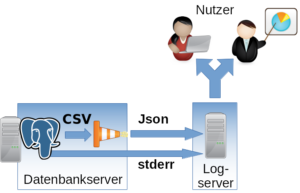
Implementation
The csvlog can serve as the basis for efficiently populating a centralized logging system. To keep further processing as simple as possible and to avoid committing to a specific logging system, we translate the log from CSV to JSON. It can then be fed in as desired. In the following example, TCP is used.
To change the log format, the following options must be adjusted in PostgreSQL®:
#------------------------------------------------------------------------------
# ERROR REPORTING AND LOGGING
#------------------------------------------------------------------------------

# - Where to Log -

log_destination = 'csvlog' # Valid values are combinations of
  # stderr, csvlog, syslog, and eventlog,
  # depending on platform. csvlog
  # requires logging_collector to be on.

# This is used when logging to stderr:
logging_collector = on # Enable capturing of stderr and csvlog
  # into log files. Required to be on for
  # csvlogs.
  # (change requires restart)
  # These are only used if logging_collector is on:
log_directory = '/var/log/postgresql' # directory where log files are written,
  # can be absolute or relative to PGDATA
For parsing and translating to JSON as well as delivering to the logging system, we use logstash® with the following configuration as a Jinja2 template:
input {
  file {
  "path" =>  "/var/log/postgresql/*.csv"
  "sincedb_path" =>  "/tmp/sincedb_pgsql"
  # fix up multiple lines in log output into one entry
  codec =>  multiline {
  pattern =>  "^%{TIMESTAMP_ISO8601}.*"
  what =>  previous
  negate =>  true
  }
  }
}

# Filter is tested for PostgreSQL®  9.5
filter {
  csv {
  columns =>  [ "pg_log_time", "pg_user_name", "pg_database_name",
  "pg_process_id", "pg_connection_from", "pg_session_id",
  "pg_session_line_num", "pg_command_tag",
  "pg_session_start_time", "pg_virtual_transaction_id",
  "pg_transaction_id", "pg_error_severity", "pg_sql_state_code",
  "pg_sql_message", "pg_detail", "pg_hint", "pg_internal_query",
  "pg_internal_query_pos", "pg_context", "pg_query",
  "pg_query_pos", "pg_location", "pg_application_name" ]
  }

  date {
  #2014-05-22 17:02:35.069 CDT
  match =>  ["log_time", "YYYY-MM-dd HH:mm:ss.SSS z"]
  }

  mutate {
  add_field =>  {
  "application_name" =>  "postgres"
  }
  }

}

output {
  tcp {
  host =>  "{{ log_server }}"
  port =>  {{ log_port }}
  codec =>  "json_lines"
  }
}
It is important that the filter for translating the CSV fields is adapted to the PostgreSQL® major version being used. The fields can differ from version to version. In most cases, new fields are added.
Also note that logstash® has difficulty recognizing the timestamp independently. The specific format should be specified (time zone).
The following variables must be set:
| {{ log_server }} | Log server, in our case a graylog® |
| {{ log_port }} | Port on the log server |
Configured this way, log files can be efficiently classified and searched. Permissions are also easier to manage.
- Permission at database level => pg_database_name
- Severity => pg_error_severity
- Permission for logs from specific hosts => pg_connection_from
- Permission for logs from specific applications => pg_application_name
Important: The normal stderr log should in any case still be included in centralized logging. After startup, no normal operational messages from PostgreSQL® will appear here, but error outputs from involved processes will. For example, the stderr output of a failed archive command can be found here. This information is essential for administration.
We already support numerous customers in operating the described procedure in production. If you have questions about this topic or need support, please feel free to contact our PostgreSQL® Competence Center.
This article was originally written by Alexander Sosna.
An interesting tool for quality assurance of C compilers is Csmith, a generator of random C programs.
I had come to appreciate it during the development of an optimization phase for a C compiler. This compiler features extensive regression tests, and the correctness of the translated programs is also tested using standardized benchmarks. The latter, for example, had uncovered a bug in my optimization because a chess program included in the benchmark collection, which was compiled with the compiler, made a different move than expected when playing against itself.
Eventually, however, these resources were exhausted, and everything seemed ready for delivery. I then remembered Csmith, which I had rather scoffed at until that point. “It can’t hurt to run it once.” To my surprise, it found further critical bugs in my code that had not been revealed by the other tests.
When my professional path led back to databases, I missed such a tool for PostgreSQL® development. One year and 269 commits later, I can now announce the first release of SQLsmith 1.0.
SQLsmith generates random SQL queries, taking into account all tables, data types, and functions present in the database. Due to their randomness, the queries are often structured significantly differently than one would write them “by hand” and therefore uncover many edge cases in the Optimizer and Executor in PostgreSQL® that would otherwise never be tested.
Already during development, SQLsmith has found 30 bugs in PostgreSQL®, which were promptly corrected by the PostgreSQL® community.
Anyone who programs extensions for PostgreSQL®, or generally develops for PostgreSQL®, now has an additional debugging tool available with SQLsmith. Users also benefit from SQLsmith through the additional quality assurance that now takes place during PostgreSQL® development.
The source code for SQLsmith is available under GPLv3 on GitHub.
This article was originally authored by Andreas Seltenreich.
Since PostgreSQL® 9.1, PostgreSQL® has implemented an interface for accessing external data sources. The interface defined in the SQL Standard (SQL/MED) allows transparent access to and manipulation of external data sources in the same manner as with PostgreSQL®-native tables. External data sources appear as tables in the respective database and can be used without restriction in SQL statements. Access is implemented via a so-called Foreign Data Wrapper (FDW), which forms the interface between PostgreSQL® and the external data source. The FDW is also responsible for mapping data types or non-relational data sources to the table structure accordingly. This also enables the connection of non-relational data sources such as Hadoop, Redis, among others. An overview of some available Foreign Data Wrappers can be found in the PostgreSQL® Wiki.
Informix FDW
In the context of many Informix migrations, credativ GmbH developed a Foreign Data Wrapper (FDW) for Informix databases. This supports migration, as well as the integration of PostgreSQL® into existing Informix installations, to facilitate data exchange and processing. The Informix FDW supports all PostgreSQL
Installation
The installation requires at least an existing IBM CSDK for Informix. The CSDK can be obtained directly via
% wget 'https://github.com/credativ/informix_fdw/archive/REL0_2_1.tar.gz'
% tar -xzf REL0_2_1.tar.gz
Subsequently, the FDW can be built by specifying the CSDK installation folder:
% export INFORMIXDIR=/opt/IBM/informix
% export PATH=$INFORMIXDIR/bin:$PATH
% PG_CONFIG=/usr/pgsql-9.3/bin/pg_config make
In the listing, the environment variable PG_CONFIG was explicitly set to the PostgreSQL® 9.3 installation. This refers to an installation of PGDG-RPM packages on CentOS 6, where
% PG_CONFIG=/usr/pgsql-9.3/bin/pg_config make install
This installs all necessary libraries. For these to function correctly and for the required Informix libraries to be found when loading into the PostgreSQL® instance, the latter must still be configured in the system’s dynamic linker. Based on the previously mentioned CentOS 6 platform, this is most easily done via an additional configuration file in /etc/ld.so.conf.d (this requires root privileges in this case!):
% vim /etc/ld.so.conf.d/informix.conf
This file should contain the paths to the required Informix libraries:
/opt/IBM/informix/lib
/opt/IBM/informix/lib/esql
Subsequently, the dynamic linker’s cache must be refreshed:
% ldconfig
The Informix FDW installation should now be ready for use.
Configuration
To use the Informix FDW in a database, the FDW must be loaded into the respective database. The FDW is a so-called EXTENSION, and these are loaded with the CREATE EXTENSION command:
#= CREATE EXTENSION informix_fdw;
CREATE EXTENSION
To connect an Informix database via the Informix FDW, one first needs a definition of how the external data source should be accessed. For this, a definition is created with the CREATE SERVER command, containing the information required by the Informix FDW. It should be noted that the options passed to a SERVER directive depend on the respective FDW. For the Informix FDW, at least the following parameters are required:
- informixdir – CSDK installation directory
- informixserver – Name of the server connection configured via the Informix CSDK (see Informix documentation, or $INFORMIXDIR/etc/sqlhosts for details)
The SERVER definition is then created as follows:
=# CREATE SERVER centosifx_tcp
  FOREIGN DATA WRAPPER informix_fdw
  OPTIONS(informixdir '/opt/IBM/informix',
  informixserver 'ol_informix1210');
The informixserver variable is the instance name of the Informix instance; here, one simply needs to follow the specifications of the Informix installation. The next step now creates a so-called Usermapping, with which a PostgreSQL® role (or user) is bound to the Informix access data. If this role is logged in to the PostgreSQL® server, it automatically uses the specified login information via the Usermapping to log in to the Informix server centosifx_tcp.
=# CREATE USER MAPPING FOR bernd
  SERVER centosifx_tcp
  OPTIONS(username 'informix',
  password 'informix')
Here too, the parameters specified in the OPTIONS directive depend on the respective FDW. Now, so-called Foreign Tables can be created to integrate Informix tables. In the following example, a simple relation with street names from the Informix server ol_informix1210 is integrated into the PostgreSQL
CREATE TABLE osm_roads(id bigint primary key,
  name varchar(255),
  highway varchar(32),
  area varchar(10));
The definition in PostgreSQL® should be analogous; if data types cannot be converted, an error will be thrown when creating the Foreign Table. When converting string types such as varchar, it is also important that a corresponding target conversion is defined when creating the Foreign Table. The Informix FDW therefore requires the following parameters when creating a Foreign Table:
- client_locale – Client locale (should be identical to the server encoding of the PostgreSQL® instance)
- db_locale – Database server locale
- table or query – The table or SQL query on which the Foreign Table is based. A Foreign Table based on a query cannot execute modifying SQL operations.
#= CREATE FOREIGN TABLE osm_roads(id bigint,
  name varchar(255),
  highway varchar(32),
  area varchar(10))
  SERVER centosifx_tcp
  OPTIONS(table 'osm_roads',
  database 'kettle',
  client_locale 'en_US.utf8',
  db_locale 'en_US.819');
If you are unsure what the default locale of the PostgreSQL ® database looks like, you can most easily display it via SQL:
=# SELECT name, setting FROM pg_settings WHERE name IN ('lc_ctype', 'lc_collate');
  name | setting
------------+------------
  lc_collate | en_US.utf8
  lc_ctype | en_US.utf8
(2 rows)
The locale and encoding settings should definitely be chosen to be as consistent as possible. If all settings have been chosen correctly, the data of the osm_roads table can be accessed directly via PostgreSQL®:
=# SELECT id, name FROM osm_roads WHERE name = 'Albert-Einstein-Straße';
  id | name
------+------------------------
  1002 | Albert-Einstein-Straße
(1 row)
Depending on the number of tuples in the Foreign Table, selection can take a significant amount of time, as with incompatible WHERE clauses, the entire data set must first be transmitted to the PostgreSQL® server via a full table scan. However, the Informix FDW supports Predicate Pushdown under certain conditions. This refers to the ability to transmit parts of the WHERE condition that concern the Foreign Table to the remote server and apply the filter condition there. This saves the transmission of inherently useless tuples, as they would be filtered out on the PostgreSQL® server anyway. The above example looks like this in the execution plan:
#= EXPLAIN (ANALYZE, VERBOSE)
  SELECT id, name
  FROM osm_roads WHERE name = 'Albert-Einstein-Straße';
  QUERY PLAN
-----------------------------------------------------------------------------------------------------------------------------
  Foreign Scan on public.osm_roads (cost=2925.00..3481.13 rows=55613 width=24) (actual time=85.726..4324.341 rows=1 loops=1)
  Output: id, name
  Filter: ((osm_roads.name)::text = 'Albert-Einstein-Straße'::text)
  Rows Removed by Filter: 55612
  Informix costs: 2925.00
  Informix query: SELECT *, rowid FROM osm_roads
  Total runtime: 4325.351 ms
The Filter display in this execution plan shows that a total of 55612 tuples were filtered out, and ultimately only a single tuple was returned because it met the filter condition. The problem here lies in the implicit cast that PostgreSQL® applies in the WHERE condition to the string column name. Current versions of the Informix FDW do not yet account for this. However, predicates can be transmitted to the Foreign Server if they correspond to integer types, for example:
#= EXPLAIN (ANALYZE, VERBOSE) SELECT id, name FROM osm_roads WHERE id = 1002;
  QUERY PLAN
--------------------------------------------------------------------------------------------------------------------------
  Foreign Scan on public.osm_roads (cost=2925.00..2980.61 rows=5561 width=40) (actual time=15.849..16.410 rows=1 loops=1)
  Output: id, name
  Filter: (osm_roads.id = 1002)
  Informix costs: 2925.00
  Informix query: SELECT *, rowid FROM osm_roads WHERE (id = 1002)
  Total runtime: 17.145 ms
(6 rows)
Data Modification
With PostgreSQL® 9.3, the Informix FDW also supports manipulating (UPDATE), deleting (DELETE), and inserting (INSERT) data into the Foreign Table. Furthermore, transactions initiated in the PostgreSQL
=# BEGIN;
BEGIN

*=# INSERT INTO osm_roads(id, name, highway) VALUES(55614, 'Hans-Mustermann-Straße', 'no');
INSERT 0 1

*=# SAVEPOINT A;
SAVEPOINT

*=# UPDATE osm_roads SET area = 'Nordrhein-Westfalen' WHERE id = 55614;
ERROR: value too long for type character varying(10)

!=# ROLLBACK TO A;
ROLLBACK

*=# UPDATE osm_roads SET area = 'NRW' WHERE id = 55614;
UPDATE 1

*=# COMMIT;
COMMIT

=# SELECT * FROM osm_roads WHERE id = 55614;
  id | name | highway | area
-------+------------------------+---------+------
  55614 | Hans-Mustermann-Straße | no | NRW
(1 row)
The example first creates a new record after starting a transaction. Subsequently, a SAVEPOINT is set to secure the current state of this transaction. In the next step, the new record is modified because the locality of the new record was forgotten to be specified. However, since only country codes are allowed, this fails due to the excessive length of the new identifier, and the transaction becomes invalid. Via the SAVEPOINT, the transaction is rolled back to the last created savepoint, and the Informix FDW also implicitly rolls back to this SAVEPOINT on the Foreign Server. Subsequently, the correct country code can be entered within this transaction. After the COMMIT, the Informix FDW also confirms the transaction on the Foreign Server, and the record has been correctly entered.
Summary
Foreign Data Wrappers are a very powerful and flexible tool for integrating PostgreSQL® into heterogeneous database landscapes. These interfaces are by no means limited to purely relational data sources. Furthermore, with the support of modifying SQL queries (DML), the FDW API also enables the integration of writable data sources into PostgreSQL® databases.
This article was originally written by Bernd Helmle.
PostgreSQL® 9.3 is here! The new major version brings many improvements and new functions. This article introduces some of the interesting innovations.
Improved Locking with Foreign Keys
Foreign keys are indispensable for the referential integrity of the data. However, up to and including PostgreSQL® 9.2, these also caused locking problems under certain conditions when UPDATE was performed on columns with foreign keys. Especially with overlapping updates of several transactions via a foreign key, deadlocks can even occur. The following example is problematic in PostgreSQL® 9.2, exemplified by this simple data model:
CREATE TABLE parent(id integer, value text);
ALTER TABLE parent ADD PRIMARY KEY(id);
CREATE TABLE child(id integer, parent_id integer REFERENCES parent(id), value text);
INSERT INTO parent VALUES(1, 'bob');
INSERT INTO parent VALUES(2, 'andrea');
Two transactions, called Session 1 and Session 2, are started simultaneously in the database:
Session 1
BEGIN;
INSERT INTO child VALUES(1, 1, 'abcdef');
UPDATE parent SET value = 'thomas' WHERE id = 1;
Session 2
BEGIN;
INSERT INTO child VALUES(2, 1, 'ghijkl');
UPDATE parent SET value = 'thomas' WHERE id = 1;
Session 1 and Session 2 both execute the INSERT successfully, but the UPDATE blocks in Session 1 because the INSERT in Session 2 holds a so-called SHARE LOCK on the tuple with the foreign key. This conflicts with the lock that the UPDATE wants to have on the foreign key. Now Session 2 tries to execute its UPDATE, but this in turn creates a conflict with the UPDATE from Session 1; A deadlock has occurred and is automatically resolved in PostgreSQL
ERROR: deadlock detected
DETAIL: Process 88059 waits for ExclusiveLock on tuple (0,1) of relation 1144033 of database 1029038; blocked by process 88031.
Process 88031 waits for ShareLock on transaction 791327; blocked by process 88059.
In PostgreSQL® 9.3, there is now a significantly refined locking mechanism for updates on rows and tables with foreign keys, which alleviates the problem mentioned. Here, tuples that do not represent a targeted UPDATE to a foreign key (i.e. the value of a foreign key is not changed) are locked with a weaker lock (FOR NO KEY UPDATE). For the simple checking of a foreign key, PostgreSQL® also uses the new FOR KEY SHARE lock, which does not conflict with it. In the example shown, this prevents a deadlock; the UPDATE in Session 1 is executed first, and the conflicting UPDATE in Session 2 must wait until Session 1 successfully confirms or rolls back the transaction.
Parallel pg_dump
With the new command line option -j, pg_dump has the ability to back up tables and their data in parallel. This function can significantly speed up a dump of very large databases, as tables can be backed up simultaneously. This only works with the Directory output format (-Fd) of pg_dump. These dumps can then also be restored simultaneously with multiple restore processes using pg_restore.
Updatable Foreign Data Wrapper and postgres_fdw
With PostgreSQL® 9.3, the API for Foreign Data Wrapper (FDW) for DML commands has been extended. This enables the implementation of updatable FDW modules. At the same time, the Foreign Data Wrapper for PostgreSQL
Event Trigger
A feature that users have been requesting for some time are Event Trigger for DDL (Data Definition Language) operations, such as ALTER TABLE or CREATE TABLE. This enables automatic reactions to certain events via DDL, such as logging certain actions. Currently, actions for ddl_command_start, sql_drop and ddl_command_end are supported. Trigger functions can be created with C or PL/PgSQL. The following example for sql_drop, for example, prevents the deletion of tables:
CREATE OR REPLACE FUNCTION del_event_func() RETURNS event_trigger AS $$
DECLARE
 v_item record;
BEGIN
 FOR v_item IN SELECT * FROM pg_event_trigger_dropped_objects()
 LOOP
 RAISE EXCEPTION 'deletion of object %.% forbidden', v_item.schema_name, v_item.object_name;
 END LOOP;
END;
$$ LANGUAGE plpgsql;

CREATE EVENT TRIGGER delete_table_obj ON sql_drop WHEN tag IN ('drop table') EXECUTE PROCEDURE del_event_func();

DROP TABLE child ;
FEHLER: deletion of object public.child forbidden
Checksums in tables
With PostgreSQL® 9.3, it is now possible in environments in which the reliability of the storage solutions used cannot be guaranteed (for example, certain cloud environments) to initialize the database cluster with checksums. PostgreSQL® organizes tuples in blocks that are 8KB in size by default. These form the smallest unit with which the database works on the storage system. Checksums now provide these blocks with additional information in order to detect storage errors such as corrupt block headers or tuple headers at an early stage. Checksums cannot be activated subsequently, but require the initialization of the physical database directory with initdb and the new command line parameter –data-checksums. This then applies to all database objects such as tables or indexes and has an impact on the speed.
Materialized Views
The new PostgreSQL® version 9.3 now also contains a basic implementation for Materialized Views. Normal views in PostgreSQL
These are just a few examples from the long list of innovations that have found their way into the new PostgreSQL® version. With JSON, improvements in streaming replication and some improvements in the configuration such as shared memory usage, many other new features have been added. For those who are interested in detailed explanations of all the new features, the
This article was originally written by Bernd Helmle.
Also worth reading: PostgreSQL Foreign Data Wrapper for Informix
VACUUM in PostgreSQL® has always been surrounded by myths and misinformation. A particularly common belief seems to be that VACUUM FULL helps as a preventive measure. In many cases, the exact opposite is true.
VACUUM – The vacuum cleaner
Since the introduction of MVCC (Multi Version Concurrency Control) in PostgreSQL® 6.5 in 1999, the VACUUM command has existed. This command defragments the so-called heap, i.e., the files that contain the table data, and frees up unused disk space. This is necessary because PostgreSQL® does not physically delete rows on UPDATE or DELETE; instead, it creates a new version of the row or simply marks the row as deleted. The old version must be retained as long as there are transactions that can still “see” that row version. If a table is heavily used for UPDATE or DELETE/INSERT, and VACUUM runs too infrequently (for example, because autovacuum is not used), the so-called “dead” space in a table can grow significantly.
VACUUM FULL – Preventive reorganization?
Many administrators therefore believe that, for this reason, it is appropriate to prevent table growth in advance by running nightly VACUUM FULL jobs. This is a poor strategy for several reasons:
- Unlike normal VACUUM, VACUUM FULL requires an exclusive table lock, meaning access is not possible for any concurrent transactions (including read-only queries).
- VACUUM FULL performs a complete physical reorganization of the table, but not of the indexes. This changed with PostgreSQL® 9.0. An exclusive table lock is still required.
- If a database uses WAL archiving, VACUUM FULL causes a massive increase in transaction log volume. This can lead to problems with the backup archive.
- You definitely need a maintenance window for exclusive access to the tables.
- Unlike normal VACUUM, VACUUM FULL is therefore not suitable for use in 24/7 databases.
While most disadvantages can be avoided with a maintenance window, the drawbacks of running VACUUM FULL very frequently are more serious. PostgreSQL® versions up to and including 8.4 are particularly affected. To understand this, you need to look at how the VACUUM FULL command works in these versions:
- VACUUM FULL scans the table sequentially for dead space. The dead areas found are stored in an array in main memory during VACUUM FULL. If the array is full (limited by maintenance_work_mem), visible (i.e., active) rows are moved from the bottom into the dead areas found (provided there is sufficient space).
- If indexes exist on the table, they must also be updated.
- Once the array has been processed, the algorithm starts over, repeating until the end of the table is reached.
- The table is then physically shrunk.
The main problem is reordering rows into the freed space. This causes massive I/O on the storage system. Even more serious, however, is the fact that the index must also be updated during reordering. If this happens very frequently, the index itself can become heavily fragmented. In that case, the index grows as well—this is known as index bloat. It may therefore be necessary to run a REINDEX on the tables directly after VACUUM FULL, especially if tables were heavily fragmented and many tuples were reordered. For very large tables, all of this also results in very long runtimes. Starting with PostgreSQL® 9.0, VACUUM FULL behaves like the CLUSTER command, i.e., the table is read sequentially and rebuilt completely in parallel. The advantage is that only active rows are read, while “dead” rows are left out. The indexes are then recreated. This eliminates many disadvantages of the old algorithm, but it does not remove the need for exclusive table locks. In addition, in the worst case, reorganizing the table requires as much additional disk space as the table currently being processed.
VACUUM and autovacuum for daily or very granular maintenance
VACUUM and autovacuum are designed for daily or continuous maintenance of PostgreSQL® databases.
- If you define a careful VACUUM policy with normal VACUUM or, even better, autovacuum, you do not need VACUUM FULL.
- Autovacuum should definitely be considered, but it must be adapted to the workload.
- If a table is still heavily bloated, then with current PostgreSQL® 8.x versions, CLUSTER can often shrink the table significantly faster, without the problem of index fragmentation. Since CLUSTER reorganizes the table based on an index, you need at least one index. You should also make sure to update the optimizer statistics afterward with ANALYZE.
- Up to and including PostgreSQL® 8.3, it is absolutely necessary to review the parameters max_fsm_pages and max_fsm_relations before going into production. The values of these parameters can only be changed by restarting the database and they influence the amount of fragmented free space recorded in tables and indexes, as well as the number of tables and indexes that can be tracked by VACUUM (VACUUM FULL does not use the so-called Free Space Map). Starting with PostgreSQL® 8.4, the FSM is adjusted automatically per table.
- Under favorable circumstances, VACUUM can also shrink a table. If the table contains only empty blocks at the end and no transaction currently wants to insert new rows into those areas, normal VACUUM can also compact the table accordingly.
So why use VACUUM FULL at all?
VACUUM FULL is a command that is not designed for daily maintenance. If the proverbial damage has already been done and a table is heavily bloated, then depending on the PostgreSQL® version, freeing disk space with VACUUM FULL is unavoidable. With older PostgreSQL® versions, administrators should consider using the CLUSTER command instead, especially when the table requires a great deal of disk space. If you still want to use VACUUM FULL, then on older PostgreSQL® versions you should also recreate the indexes with REINDEX. More information on this topic can be found in the PostgreSQL® Wiki.
Further information
All blog posts on PostgreSQL® are also available as the PostgreSQL® category with its own feed. We are also happy to help with support and services for PostgreSQL®.
This post was originally written by Bernd Helmle.