
[Howto] Centralized and Semantic Logging for PostgreSQL®
| Categories: | HowTos PostgreSQL® |
|---|---|
| Tags: | Logging PostgreSQL® |
Introduction
Today, there is no need to argue why centralized logging is useful or even necessary. Most medium-sized companies now have centralized logging or are currently implementing it.
Once the infrastructure is in place, it is important to use it effectively and efficiently! Especially as an infrastructure operator or service provider, the goal is to optimally support different stakeholders with different requirements. For example, the development department should have continuous access to all logs from their test systems. However, from production, perhaps only all error messages are needed in real time, but more upon request.
Such models can be easily implemented and tested with graylog® or Kibana®. Classification and analysis may work well and efficiently in test operations or small environments with PostgreSQL® default settings. However, when operating a large number of databases or retaining logs for extended periods, usage can quickly become difficult.
Problem Statement
Log entries are centrally captured and can in principle be used. In practice, however, it is difficult to impossible to extract all relevant information in a timely manner. Searching for specific entries requires full-text searches with wildcards, which is no longer practical with large data volumes.
For example, if you want to grant specific groups access exclusively to logs that meet certain functional criteria, such as database name, error_severity, or similar, this must be implemented through full-text search and error-prone filters.
If a DBA wants to see all messages from a specific user, a specific query, or a session, this requires particularly complex indexing for wildcard searches. Alternatively, such queries are very slow and cannot be answered immediately.
| Starting Point: | Centralized logging has already been implemented, e.g., ELK Stack or graylog®. |
| Goal: | We want to capture PostgreSQL® log messages semantically and thereby efficiently: classify, group, and analyze them. |
Alternative
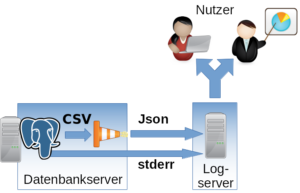
The alternative is to capture log messages semantically and store the individual fields in an appropriate data structure.
If the normal stderr log is used, parsing becomes difficult to impossible, as the individual fields cannot be identified. However, PostgreSQL® also offers the option to produce log messages in CSV format (csvlog). This outputs all fields comma-separated.
Excursus: The idea is not new. For a long time, some DBAs have been loading their logs directly back into a PostgreSQL® table. This allows them to search and process the logs with SQL and all familiar built-in tools. DBAs are usually very satisfied with this construct, but it represents an isolated solution. Example table for PostgreSQL® 9.5: CREATE TABLE postgres_log ( log_time timestamp(3) with time zone, user_name text, database_name text, process_id integer, connection_from text, session_id text, session_line_num bigint, command_tag text, session_start_time timestamp with time zone, virtual_transaction_id text, transaction_id bigint, error_severity text, sql_state_code text, message text, detail text, hint text, internal_query text, internal_query_pos integer, context text, query text, query_pos integer, location text, application_name text, PRIMARY KEY (session_id, session_line_num) ); |
Structure
Implementation
The csvlog can serve as the basis for efficiently populating a centralized logging system. To keep further processing as simple as possible and to avoid committing to a specific logging system, we translate the log from CSV to JSON. It can then be fed in as desired. In the following example, TCP is used.
To change the log format, the following options must be adjusted in PostgreSQL®:
#------------------------------------------------------------------------------
# ERROR REPORTING AND LOGGING
#------------------------------------------------------------------------------

# - Where to Log -

log_destination = 'csvlog' # Valid values are combinations of
  # stderr, csvlog, syslog, and eventlog,
  # depending on platform. csvlog
  # requires logging_collector to be on.

# This is used when logging to stderr:
logging_collector = on # Enable capturing of stderr and csvlog
  # into log files. Required to be on for
  # csvlogs.
  # (change requires restart)
  # These are only used if logging_collector is on:
log_directory = '/var/log/postgresql' # directory where log files are written,
  # can be absolute or relative to PGDATA
For parsing and translating to JSON as well as delivering to the logging system, we use logstash® with the following configuration as a Jinja2 template:
input {
  file {
  "path" =>  "/var/log/postgresql/*.csv"
  "sincedb_path" =>  "/tmp/sincedb_pgsql"
  # fix up multiple lines in log output into one entry
  codec =>  multiline {
  pattern =>  "^%{TIMESTAMP_ISO8601}.*"
  what =>  previous
  negate =>  true
  }
  }
}

# Filter is tested for PostgreSQL®  9.5
filter {
  csv {
  columns =>  [ "pg_log_time", "pg_user_name", "pg_database_name",
  "pg_process_id", "pg_connection_from", "pg_session_id",
  "pg_session_line_num", "pg_command_tag",
  "pg_session_start_time", "pg_virtual_transaction_id",
  "pg_transaction_id", "pg_error_severity", "pg_sql_state_code",
  "pg_sql_message", "pg_detail", "pg_hint", "pg_internal_query",
  "pg_internal_query_pos", "pg_context", "pg_query",
  "pg_query_pos", "pg_location", "pg_application_name" ]
  }

  date {
  #2014-05-22 17:02:35.069 CDT
  match =>  ["log_time", "YYYY-MM-dd HH:mm:ss.SSS z"]
  }

  mutate {
  add_field =>  {
  "application_name" =>  "postgres"
  }
  }

}

output {
  tcp {
  host =>  "{{ log_server }}"
  port =>  {{ log_port }}
  codec =>  "json_lines"
  }
}
It is important that the filter for translating the CSV fields is adapted to the PostgreSQL® major version being used. The fields can differ from version to version. In most cases, new fields are added.
Also note that logstash® has difficulty recognizing the timestamp independently. The specific format should be specified (time zone).
The following variables must be set:
| {{ log_server }} | Log server, in our case a graylog® |
| {{ log_port }} | Port on the log server |
Configured this way, log files can be efficiently classified and searched. Permissions are also easier to manage.
- Permission at database level => pg_database_name
- Severity => pg_error_severity
- Permission for logs from specific hosts => pg_connection_from
- Permission for logs from specific applications => pg_application_name
Important: The normal stderr log should in any case still be included in centralized logging. After startup, no normal operational messages from PostgreSQL® will appear here, but error outputs from involved processes will. For example, the stderr output of a failed archive command can be found here. This information is essential for administration.
We already support numerous customers in operating the described procedure in production. If you have questions about this topic or need support, please feel free to contact our PostgreSQL® Competence Center.
This article was originally written by Alexander Sosna.
| Categories: | HowTos PostgreSQL® |
|---|---|
| Tags: | Logging PostgreSQL® |
About the author
credativ Redaktion
about the person
This account serves as a hub for the valuable contributions of former credativ employees. We would like to thank them for their great content, which has enriched the technical knowledge on our blog over the years. Their articles remain accessible to our readers here.