
We are very pleased to announce an important piece of news: credativ GmbH is now a certified training partner of Proxmox Server Solutions GmbH. This expands our many years of Proxmox expertise with an official training offering – delivered by our certified trainers, with a certificate of participation directly from Proxmox.
(more…)What is PegaProx?

PegaProx is becoming a central platform for modern Proxmox VE-based virtualization, offering a free and open source approach to managing virtualization at scale. It is increasingly seen as a powerful multi cluster solution designed for more demanding enterprise setups. Where traditional tools start to fall short and even the native Proxmox Datacenter Manager does not yet cover many key requirements, PegaProx fills that gap by providing a consistent and clearly structured way to manage complex infrastructures.
As a central control unit, PegaProx unifies all aspects of cluster management (including multi-cluster management and Proxmox Backup Server) in a single interface, creating a consistent view of all resources, workloads, and systems. Administrators no longer need to switch between individual clusters, nodes, or isolated monitoring solutions; instead, they gain a fully integrated environment that significantly increases transparency, control, and efficiency. Especially in growing infrastructures with multiple clusters, this approach becomes a decisive advantage. In daily operations, virtualization managers repeatedly face the same challenges. Resources must be monitored across clusters, bottlenecks identified early, and maintenance work coordinated without jeopardizing availability. At the same time, increasing complexity raises the risk of misconfigurations, inconsistent states, and unplanned outages. Other features familiar from other well-known enterprise virtualization solutions also play a central role in PegaProx. PegaProx addresses these problems with a consistently centralized architecture, real-time metrics, and intelligent automation that simplifies operational processes and implements previously missing functionalities.
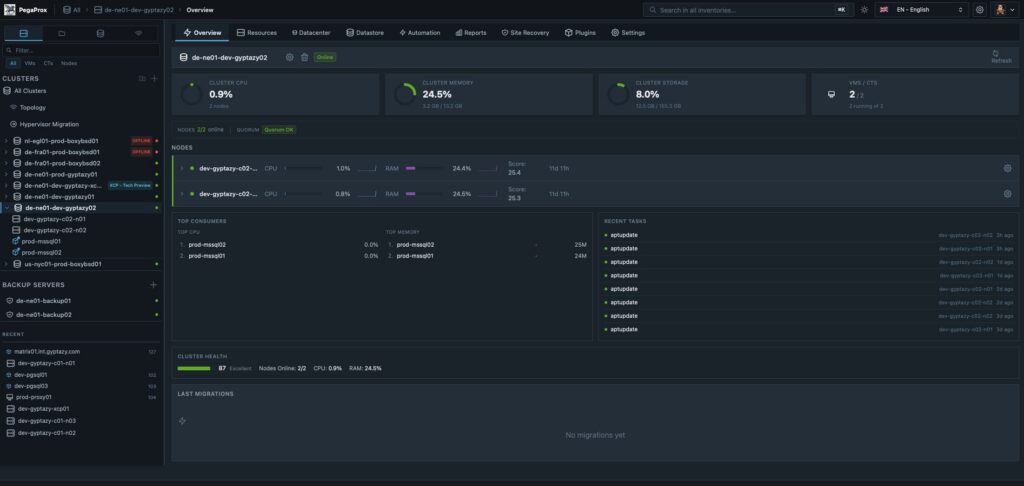
PegaProx for Proxmox: Cluster Overview
Developed by a small, focused team with strong practical relevance, which includes our colleague Florian Paul Azim Hoberg (also known as gyptazy) as a core contributor, PegaProx places particular emphasis on real requirements from the enterprise environment. Functions such as managing multiple clusters as a logical unit, a global overview of snapshots including a clean-up function, or the dynamic distribution of workloads based on current resource data (ProxLB) are not theoretical concepts, but specifically developed solutions for productive use. The result is a platform that elevates Proxmox VE to a new level and offers companies a powerful, scalable, and understandable solution for their virtualization strategy.
What does PegaProx offer?
PegaProx combines a variety of functions specifically developed for the professional operation of Proxmox VE-based infrastructures. The focus is clearly on central control, automation, and transparency across multiple clusters. Instead of fragmented tools, an integrated platform emerges that simplifies daily operations and reliably maps complex enterprise requirements.
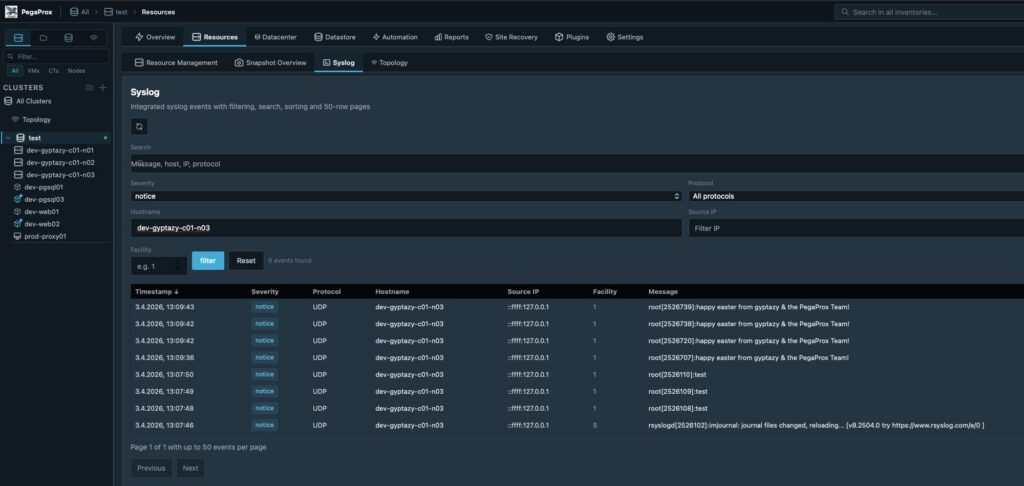
PegaProx with central, aggregated logging overview
To align this with the ProxTools Collection, created by @gyptazy, such as ProxLB, ProxCLMC, ProxPatch, ProxSnap, and ProxLog, have also been integrated and now offer a way to administer them via PegaProx’s graphical interface for easy usability. Key functions include:
- Multi-Cluster Management
- Unified Dashboard
- Multi-Tenancy & End-User Self-Service Portal
- Live Metrics
- Cross-Cluster Load Balancing
- Live Migration
- Cross-Cluster Live Migration
- High Availability and Automatic Failover
- Snapshots and Snapshot Replication
- Centralized Snapshot Overview
- Backup Management including Verification
- Role-Based Access Control and Multi-Tenancy
- Integration of External Authentication Systems
- Automation and Scheduled Tasks
- Rolling Updates / Patch Management for Cluster Nodes
- Integrated Syslog Server
- Ceph Management
- Audit Logging and Monitoring Alerts
- and much more
This represents only some of the capabilities PegaProx already offers today. Many other functions and continuous developments constantly expand the platform, closely aligning with the real requirements of modern virtualization environments. A complete overview of all features, technical details, and current developments can be found on the official PegaProx GitHub page, where all functions are transparently documented and continuously updated.
Installation & Configuration of PegaProx
The installation of PegaProx is deliberately designed to be flexible, covering a wide range of environments and requirements. Whether for quick evaluation, integration into existing infrastructures, or productive enterprise use, PegaProx can be deployed in several ways and seamlessly integrated into existing Proxmox VE landscapes. All installation methods pursue the same goal: the simplest, most reproducible, and transparent deployment possible without unnecessary complexity.
The following options are available for installation:
- Bash Script
A quick and easy way to get started using an automated installation script (however, we strongly advise against this method, even though it is becoming increasingly popular again):curl -sSL https://raw.githubusercontent.com/PegaProx/project-pegaprox/refs/heads/main/deploy.sh | sudo bash - Docker Container Image
Deployment as a container for maximum portability and easy integration into existing container environments - LXC Appliance
Prebuilt LXC template for direct use in Proxmox VE with minimal setup effort - VM Appliance
Fully preconfigured virtual machine for fast and isolated commissioning - Debian Package
Native installation via a Debian package for systems that are intentionally to be operated without containers - Debian Repository
Central package source for easy updates, versioning, and integration into existing package management processes
Regardless of the chosen method, the basic configuration is quickly completed, so PegaProx is available as a central management platform for multiple Proxmox VE clusters within a very short time.
Conclusion
PegaProx is rapidly developing into one of the most exciting solutions in the field of Proxmox VE-based virtualization and is already generating great enthusiasm in the community. Many companies already see PegaProx as the central platform they have been missing in the Proxmox ecosystem, especially when it comes to multi-cluster management, automation, and a consistent overall overview.
The clear structure, practical range of functions, and consistent focus on real requirements in the enterprise environment clearly demonstrate the platform’s potential. PegaProx not only closes existing gaps but also defines a new standard in many areas for managing complex virtualization landscapes.
Despite this positive development, it should be noted that PegaProx is currently still in its beta phase. Even though much already functions stably and thoughtfully, problems or unexpected behavior can occur at any time. For productive environments, its use should therefore be carefully considered and, if necessary, first implemented in test or staging scenarios.
Errors, wishes, or suggestions for improvement can be reported at any time via the project on GitHub. Additionally, the developers are available directly via the gyptazy projects Discord server for exchange and support.
Proxmox VE® has established itself as an open-source virtualization platform, but even experienced IT administrators encounter treacherous pitfalls during cluster configuration. A single Proxmox® cluster error can cripple your entire enterprise infrastructure and lead to costly downtime. The good news: most of these problems are predictable and avoidable.
From split-brain scenarios to flawed backup strategies – these ten most common virtualization errors have caused countless IT projects to fail. Learn how to avoid these critical stumbling blocks and elevate your Proxmox® cluster management to a professional level. (more…)
Proxmox® VE is fundamentally free – the Community Edition is released under AGPL and can be used completely free of charge. For companies that require professional support and extended features, there are paid Enterprise Subscriptions. Additionally, there are alternative service offerings that replace vendor support. The actual costs depend on your specific requirements, the desired support level, and additional factors such as hardware and administration.
What is Proxmox and why is it interesting for companies?
Proxmox VE is an open-source virtualization platform that combines KVM virtualization and LXC containers on a unified web interface. The software enables companies to efficiently utilize physical servers by running multiple virtual machines on a single host system.
For businesses, Proxmox offers several decisive advantages: The platform reduces hardware costs through optimized server utilization, simplifies IT management through central administration, and provides high availability through cluster functions. As an open-source solution, there are no license costs for the basic functions.
The platform is characterized by a flexible cost model. While commercial hypervisor solutions often demand significant license fees, you can use Proxmox without restrictions on virtualization functions. Small and medium-sized enterprises, in particular, benefit from this cost-efficient approach.
Which Proxmox versions are available and what do they cost?
Proxmox offers two main versions: the free Community Edition and the paid Enterprise Subscription. The Community Edition – not to be confused with the Community Subscription – includes all virtualization functions without functional limitations but uses free update repositories.
The Enterprise Subscription offers various support levels with different response times and ticket quotas. Current prices and service scopes can be found at https://www.proxmox.com/de/produkte/proxmox-virtual-environment/preise.
The main difference lies not in the features, but in the support level and update repositories. Enterprise customers gain access to stable, tested updates and professional support directly from the Proxmox team. The Community Edition offers the same technical capabilities, but without guaranteed support services. In between, there is also the so-called Community Subscription, where the customer gets access to the Enterprise repositories for a small annual fee. Proxmox Server Solutions points out that they do not consider the Community Subscription to be Enterprise-ready, as there is no claim to support from the manufacturer. However, it must be noted here that there are alternative support offerings for this version, such as credativ’s Virtualization Services for Proxmox.
When is a Proxmox Enterprise Subscription really worthwhile?
An Enterprise Subscription is worthwhile if your company relies on stable, productive virtualization environments and requires professional support. Critical business applications that demand high availability justify the investment in Enterprise support.
Decision criteria for switching include:
- Productive environments with critical applications
- More than 10–15 virtual machines in operation
- Lack of internal Linux® and virtualization expertise
- Compliance requirements that necessitate professional support
- 24/7 operation without internal night shifts
The Return on Investment is demonstrated through reduced downtime, faster problem resolution, and predictable update cycles. If the cost of a one-hour system outage exceeds the annual subscription costs, the Enterprise version clearly pays off.
credativ® as an open-source company recommends that customers acquire at least the Community Subscription to gain access to stable repositories and simultaneously support the project.
What are the hidden costs of Proxmox implementations?
In addition to licensing costs, other expenses often underestimated arise. Hardware requirements, training, ongoing administration, and backup solutions can significantly influence the total costs. Realistic budget planning should consider these factors.
Additional cost factors include:
- Hardware: Servers, storage, network equipment (often 70–80% of total costs)
- Training: 2–5 days of training per administrator
- Administration: 10–20% of a full-time position for smaller environments
- Backup software: Various solutions available
- Monitoring tools: Diverse options depending on requirements
- Disaster Recovery: Hardware and location costs
A realistic total cost estimate for a small business environment over three years is €15,000–€50,000, with hardware accounting for the largest share. Plan for approximately 20–30% buffer for unforeseen requirements.
How does Proxmox differ from other virtualization solutions in terms of cost?
Proxmox offers a flexible cost model compared to commercial solutions. While VMware vSphere® or Microsoft® Hyper-V® incur licensing costs, Proxmox® only has optional support costs. This can significantly reduce the Total Cost of Ownership.
Further differences emerge when considering TCO: Proxmox requires more Linux® expertise but offers complete control over the system. Commercial solutions often provide more extensive management tools but incur ongoing licensing costs. Some integrate seamlessly into Windows® environments but require corresponding server licenses.
The main advantage of Proxmox lies in its scalability without license tier jumps. While commercial solutions can become exponentially more expensive with growing infrastructure, Proxmox costs remain linearly predictable.
How does credativ support Proxmox implementations?
credativ® offers comprehensive services for Proxmox projects, from initial consultation to ongoing operation. Our expertise includes license consulting, professional installation, 24/7 support, and training for your IT teams. We also assist with complex migrations from existing virtualization platforms.
Our specific services for Proxmox include:
- Needs analysis and license consulting for optimal cost control
- Professional installation and configuration of Proxmox® clusters
- 24/7 support and maintenance by certified Linux® specialists
- Authorized partner of Proxmox Server Solutions GmbH
- Practical training for administrators and IT teams
- Migration from existing virtualization platforms
- Backup and Disaster Recovery concepts
- Performance optimization and monitoring setup
Our specialists have many years of experience with open-source virtualization and support you with all aspects of your Proxmox® implementation. From hardware dimensioning to the automation of administrative tasks – we ensure the smooth operation of your virtualization infrastructure.
Arrange a non-binding consultation today to learn how Proxmox can reduce your IT costs while increasing the flexibility of your infrastructure. Contact us for an individual analysis of your requirements.
Transparency notice
Proxmox® is a registered trademark of Proxmox Server Solutions GmbH (credativ® = authorized reseller). Linux® is a registered trademark of Linus Torvalds. VMware® and vSphere® are registered trademarks of Broadcom Inc. Microsoft®, Windows® and Hyper-V® are registered trademarks of Microsoft Corporation.
The mention of the brands serves exclusively for the factual description of migration scenarios and services provided by credativ®. There is no business relationship with the mentioned brand owners without explicit mention of a partnership.
Proxmox® installation is a crucial step for companies looking to implement a professional virtualization solution. This comprehensive guide will walk you through the entire Proxmox VE installation process and help you set up a stable hypervisor environment. You will need basic Linux® knowledge and approximately 2–3 hours for the complete installation and basic configuration. For this Proxmox guide, you will need a dedicated server with at least 4 GB RAM, an 8 GB USB stick, and access to the target computer’s BIOS. After completing these steps, you will have a fully functional Proxmox VE system for your server virtualization. Please note, however, that this hardware configuration is far too limited for a production system. For initial steps, however, it is suitable. (more…)
Proxmox® offers four storage options: ZFS for local high-performance storage with integrated snapshots and compression, Ceph for distributed high-availability systems, NFS for file-based network storage, and iSCSI for block-based enterprise solutions. The choice depends on your performance requirements, budget, and infrastructure size. Each option is suitable for specific virtualization scenarios.
(more…)The decision for credativ Proxmox Enterprise Support depends on your business requirements, the criticality of your virtualization environment, and your available internal IT resources. Enterprise Support offers professional assistance, stable updates, and advanced features, while the Community Edition remains free but without guaranteed support. This analysis will help you make the right decision for your company.
What is Proxmox Enterprise Support and how does it differ from the Community Edition?
Proxmox Enterprise Support is the paid version of the virtualization platform, offering professional support, stable updates, and access to enterprise repositories. The community repositories provide the same basic functionality for free, but without a support guarantee and with less thoroughly tested updates. Both versions are provided by Proxmox Server Solutions GmbH under the AGPL license. However, there is an important additional distinction: those who wish to save costs can gain access to the enterprise repositories by purchasing a so-called Community Subscription. This, however, only includes access and no further support.
The most significant difference lies in the support level. Enterprise customers receive direct access to the Proxmox team for technical issues, while community users rely on forums and community assistance. Enterprise Support includes various service levels, from Standard to Premium, with different response times.
The update cycles differ significantly. Enterprise repositories contain thoroughly tested, stable updates optimized for production environments. Community updates appear more frequently but are less intensively tested and can be more unstable.
Additional enterprise features include advanced backup options, cluster management tools, and specialized monitoring options. These features are not available in the Community Edition and are specifically tailored to enterprise requirements.
When is Proxmox Enterprise Support worthwhile for businesses?
Enterprise Support is particularly worthwhile for companies with critical production environments, limited internal IT resources, or strict compliance requirements. Companies with approximately 50 employees or more, or those with high availability demands, generally benefit from professional support.
A critical factor is the availability requirements of your systems. If outages cause high costs or significantly disrupt business processes, investing in Enterprise Support is justified. This applies particularly to e-commerce, financial service providers, or manufacturing operations.
Internal IT expertise plays a crucial role. If specialized virtualization experts are lacking in the team, Enterprise Support provides valuable assistance with complex problems. Smaller IT teams particularly benefit from the available expertise.
Compliance requirements may necessitate Enterprise Support. Many industries require documented support for audit purposes. Enterprise Support provides the necessary documentation and traceability for regulated environments.
What does Proxmox Enterprise Support cost and what licensing models are available?
Proxmox Enterprise Support is licensed per CPU socket with various support levels. Prices start at 120 Euros per socket per year for access to the enterprise repositories without support, while Premium Support incurs significantly higher costs but offers faster response times. (As of January 1, 2026)
The Basic or Standard package includes access to enterprise repositories, updates, and email support during business hours. This level is suitable for smaller environments without particularly high availability requirements.
Premium Support offers shorter response times and extended services. The costs are significantly higher, but for critical systems, they are well justified by minimized downtime.
Additional cost factors include the number of CPU sockets, desired response times, and special services such as on-site support or individual training. Larger deployments often receive volume discounts.
What alternatives are there to Proxmox Enterprise Support?
Alternatives to official Enterprise Support include Community Support, third-party service providers, in-house expertise development, or hybrid approaches. Each option offers different advantages and disadvantages depending on the company’s situation.
Community support via forums and documentation remains free but offers no guarantees for response times or problem resolution. Experienced IT teams can often find solutions independently, while less experienced teams may struggle.
Support from specialized third-party providers like credativ GmbH can be more cost-effective than official Enterprise Support. These providers often understand local requirements better and offer more flexible service packages. However, quality varies among providers.
Developing in-house expertise through training and certifications offers long-term independence but requires investment in personnel and time. Hybrid approaches combine internal expertise with external open-source support for particularly complex problems.
How credativ® helps with Proxmox decisions and support
credativ® supports you in the strategic decision for the appropriate Proxmox support strategy and offers comprehensive technical support for your virtualization environment. As a vendor-independent open-source specialist, we analyze your requirements and develop tailored support concepts.
Our Proxmox services include:
- Needs analysis and support strategy consulting for your virtualization environment
- 24/7 technical support with direct access to Linux and virtualization experts
- Optional: Proactive monitoring and maintenance of your Proxmox clusters
- Migration and implementation of Proxmox solutions
- Training and knowledge transfer for your IT teams
- Hybrid support models as an alternative to pure Enterprise Support
With over 25 years of experience in the open-source sector, we offer you the security of professional support without vendor lock-in. Contact us for a free consultation on your optimal Proxmox support strategy.
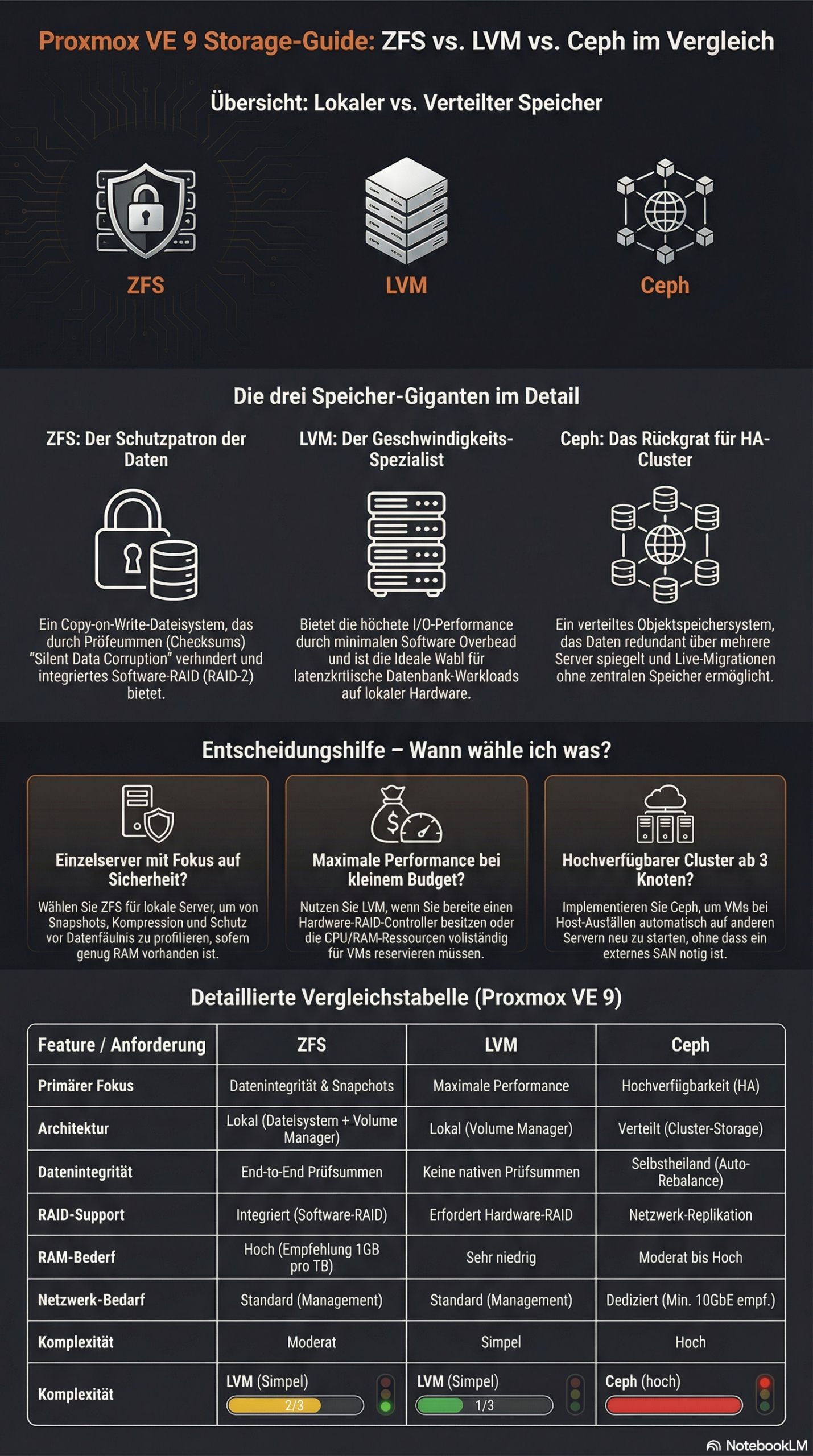
The choice between ZFS, LVM, and Ceph in Proxmox depends on your specific requirements. ZFS offers integrated data redundancy and snapshots for local systems, LVM enables flexible volume management with high performance, while Ceph provides distributed storage solutions for cluster environments. Each technology has different strengths in terms of performance, scalability, and maintenance effort.
What is the difference between ZFS, LVM, and Ceph in Proxmox?
ZFS is a copy-on-write file system with integrated volume management and data redundancy. It combines a file system and volume manager into one solution and offers features such as snapshots, compression, and automatic error correction. ZFS is particularly suitable for local storage scenarios with high data integrity requirements.
LVM (Logical Volume Manager)
Ceph represents a fully distributed storage architecture that replicates data across multiple nodes. It provides object, block, and file storage in a single system and scales horizontally. Ceph is suitable for large cluster environments with high availability requirements.
Which storage solution offers the best performance for different workloads?
LVM with ext4 or XFS delivers the highest performance for I/O-intensive applications such as databases. The low overhead makes it the first choice for latency-critical workloads. ZFS follows with good performance alongside data integrity features, while Ceph exhibits higher latency due to network overhead.
For database workloads, LVM with fast SSDs and direct access is recommended. The minimal abstraction layer reduces latency and maximizes IOPS. ZFS can offer competitive performance here through ARC cache and L2ARC acceleration, especially for read-heavy workloads.
File services benefit from ZFS features such as deduplication and compression, which save storage space.
Ceph is suitable for distributed file services with high availability requirements, even if performance is limited by network communication. Here, virtual machines can be migrated from host to host with virtually no delay, whether using a tool like ProxLB or in the event of a failover.
Virtual machines run well on all three systems. LVM offers the best raw performance, ZFS enables efficient VM snapshots, and Ceph provides live migration between hosts without shared storage.
| Feature | LVM | ZFS | Ceph |
|---|---|---|---|
| Architecture Type | Local (Block Storage) | Local (File System & Volume Manager) | Distributed (Object/Block/File) |
| Performance (Latency) | Excellent (Minimal Overhead) | Good (Scales with RAM/ARC) | Moderate (Network Dependent) |
| Snapshots | Yes | Yes (very efficient) | Yes |
| Data Integrity | Limited (RAID-dependent) | Excellent (Checksumming) | Excellent (Checksumming) |
| Scalability | Limited (Single Node) | Medium (within host) | Very high (Horizontal in cluster) |
| Network Requirements | Standard (1 GbE sufficient) | Standard (1 GbE sufficient) | High (min. 10-25 GbE recommended) |
| Main Application Area | Maximum single-node performance | High data security & local speed | Enterprise cluster & high availability |
| Complexity | Simple | Moderate | High |
How do you decide between local and distributed storage architecture?
Local storage solutions such as ZFS and LVM are suitable for single-host environments or when maximum performance is more important than high availability. Distributed systems like Ceph are necessary when data must be available across multiple hosts or when automatic failover mechanisms are required.
Infrastructure size plays a decisive role. Individual Proxmox hosts or small setups with two to three servers work well with local storage solutions. From three to four hosts, Ceph becomes interesting as it enables true high availability without a single point of failure. Ceph requires a quorum, so an odd number of nodes is always required for Ceph. Cluster setups with an even number are therefore always subject to some variation in usage – but manual adjustments are also required in Proxmox VE here.
Network requirements differ significantly. Local storage systems only require a standard network for management, while Ceph requires dedicated 10GbE connections for optimal performance. Today, for certain performance needs, 25GbE connections are preferred for the data load. Ideally, these connections are available exclusively to the Ceph system and are in addition to the virtualization requirements. The network infrastructure therefore significantly influences the storage decision.
Maintenance effort and complexity increase with distributed systems. ZFS and LVM are easier to understand and maintain, while Ceph requires specialized knowledge for configuration, monitoring, and troubleshooting.
Proxmox VE with ZFS offers a middle ground between true shared storage and local data storage with pe-sync. This allows hosts to be kept in sync automatically. However, this is not synchronous but occurs at specific intervals, such as every 15 minutes. For certain workloads, this can be perfectly sufficient.
What are the most important factors in Proxmox storage planning?
Hardware requirements vary greatly between storage technologies. ZFS requires sufficient RAM (1 GB per TB of storage) so that the integrated ARC cache can reach its full performance, LVM runs on minimal hardware, and Ceph requires dedicated network hardware, as well as sufficient RAM and multiple hosts. Hardware equipment often determines the available storage options.
Backup strategies must match the chosen storage solution. ZFS snapshots enable efficient incremental backups, LVM snapshots offer similar functionality, while Ceph backups are implemented via RBD snapshots or external tools. Backup requirements significantly influence the choice of storage.
Scalability planning should take future growth into account. LVM allows for easy volume expansion, ZFS pools can be expanded with additional drives, and Ceph scales by adding new hosts. The planned growth direction influences the optimal storage architecture.
Budget considerations include not only hardware costs but also maintenance effort and the required expertise. Simple LVM setups have low total costs, while Ceph clusters require higher investments in hardware and training.
Bonus: ZFS and Ceph both offer integrated checksumming procedures that actively help against so-called "bit rot" – creeping data corruption – and can automatically detect and correct it through redundancy. LVM without additional layers like a RAID layer does not allow for this.
How credativ® supports Proxmox storage optimization
credativ® offers comprehensive consulting and implementation for optimal Proxmox storage decisions based on your specific requirements. Our open-source experts analyze your workloads, infrastructure, and growth plans to recommend the ideal storage architecture.
Our services include:
- Detailed storage architecture assessment and technology selection
- Professional implementation and configuration of ZFS, LVM, or Ceph
- Performance optimization and monitoring setup for selected storage solutions
- 24/7 support and maintenance for production Proxmox environments
- Training for your IT team on storage management and best practices
With over 25 years of experience in the open-source sector and direct access to our permanent Linux specialists, you receive professional Proxmox support without going through call centers. Contact us for a personalized consultation on your Proxmox storage strategy and benefit from our proven enterprise support.
The correct setup of a Proxmox® Backup Server is crucial for data security in businesses. This guide shows you how to fully configure Proxmox PBS from installation to automation.
Difficulty: Advanced – You need basic Linux® knowledge and virtualization experience.
Time required: 3–4 hours for complete setup, including tests.
Required Resources:
- Dedicated hardware or VM with at least 4 GB RAM
- Proxmox® Backup Server ISO image
- Network access with a fixed IP address
- Sufficient storage space for backups
- Administrator access to Proxmox VE (optional)
Why Proxmox Backup Server is a professional solution
Proxmox Backup Server offers businesses a cost-efficient backup solution with a flexible licensing model. The open-source solution integrates seamlessly into existing Proxmox VE environments and provides professional features without the overhead of proprietary alternatives.
Key advantages of Proxmox PBS:
- Automatic deduplication significantly reduces storage requirements
- End-to-end encryption protects sensitive data
- Incremental backups minimize network load
- Web interface simplifies management
- Scalability from small to large environments
Direct integration with Proxmox VE enables VM backups without additional agents. Furthermore, other data sources can be integrated via standard protocols.
System Requirements and Preparation
Before installation, check all hardware and software requirements to ensure stable operation.
Minimum hardware requirements:
- CPU: 64-bit processor with at least 2 cores
- RAM: 4 GB (8 GB recommended for larger environments)
- Storage: 32 GB for the system plus separate backup storage
- Network: Gigabit Ethernet recommended
The backup server requires a fixed IP address and access to all systems to be backed up. Ensure that your firewall rules allow traffic on Port 8007 (web interface) and Port 8009 (backup protocol).
Plan storage requirements realistically: Calculate the space needed for your full backups plus 20–30% for metadata and deduplication overhead.
Install and Configure Proxmox Backup Server
Download the latest Proxmox Backup Server ISO image from the official website. Then, create a bootable USB stick or mount the ISO directly in your virtualization environment.
Start the system from the installation medium. The installer will guide you step-by-step through the basic configuration:
- Select target disk for installation
- Configure time zone and keyboard layout
- Set a secure root password
- Configure network settings with a fixed IP
- Confirm installation parameters and start installation

After restarting, you can access the web interface at https://your-ip:8007. Log in with the root account and check the network and DNS configuration under “Administration”.
Create additional user accounts for daily operation. The root account should only be used for administrative tasks, not for regular backup jobs. A detailed step-by-step guide can be found in our older article.
Set up Backup Repositories and Storage
Navigate to “Datastore” and click “Add Datastore” to set up the first data store for your backups. Assign a meaningful name and select the target path. For optimal performance, separate hard drives or RAID arrays are recommended.
Important configuration options in the Datastore:
- GC Schedule: Automatic garbage collection for deleted backups
- Prune Schedule: Automatic deletion of old backups according to defined retention rules
- Verify Schedule: Regular integrity check of backup data
PBS automatically activates deduplication. It detects identical data blocks and stores them only once – for VMs with similar operating systems, savings of 50–80% are realistic.
Test the datastore with a small test backup before setting up production jobs. Check write speed and available storage space.
Create and Automate Backup Jobs
For Proxmox® VE VMs, configure backup jobs directly in the VE interface under “Datacenter” > “Backup”. Create a new job there with the following parameters:
- Select PBS as storage target
- Define VMs or containers for backup
- Set schedule (daily, weekly)
- Configure retention rules (keep-daily, keep-weekly, keep-monthly)
- Enable email notifications
For other data sources, use the Proxmox® Backup Client. Install it on the source systems and control backup execution via cron jobs and backup scripts.
Run each backup job manually once before automation. Check the log files for errors and ensure that all desired data is fully captured.
Monitoring: Configure email notifications for successful and failed backups. Regularly monitor backup sizes and runtimes to detect deviations early.
How credativ® Helps with Proxmox Backup Server
We support you with the professional implementation and ongoing operation of Proxmox Backup Server in your enterprise environment. Our open-source specialists bring many years of experience with enterprise backup solutions.
Our services for Proxmox PBS:
- Professional consulting for optimal backup architecture
- Installation and configuration according to best practices
- 24/7 support for critical backup issues
- Monitoring and proactive maintenance of your backup infrastructure
- Disaster recovery planning and testing
- Training for your IT team
Benefit from our comprehensive Proxmox support and our direct connection to the developers. We help you build a reliable and scalable backup solution that grows with your business.
Contact us for a free initial consultation regarding your Proxmox Backup Server implementation. Our experts will work with you to develop the optimal backup strategy for your requirements.
Transparency notice
Proxmox® is a registered trademark of Proxmox Server Solutions GmbH. credativ® is an authorized reseller of Proxmox® products. Linux® is a registered trademark of Linus Torvalds.
The mention of trademarks serves solely for the factual description of migration scenarios and services provided by credativ®. There is no business relationship with the mentioned trademark owners.
A stable Proxmox® cluster requires precise Corosync configuration for reliable cluster communication. This guide shows you how to optimally set up your Proxmox® cluster network and correctly configure Corosync. The usual process for system administrators with basic Proxmox® VE knowledge is correctly set up by the automatic installer or in the Proxmox VE frontend, requiring no manual work.
We explicitly advise against working on the configuration without deep knowledge of Corosync’s intricacies and the consequences of custom settings. This should be left to specialists with expertise. However, this overview may be helpful for experimentation and further education. (more…)
Update: Proxday will now take place on October 15, 2026. We have moved the date to avoid a clash with the Dutch Proxmox Day of our friends at Tuxis. All other information remains current – the CfP deadline is extended accordingly to July 31, 2026.

Save the Date: On October 15, 2026, we are bringing the Proxmox world together in Mönchengladbach. With Proxday 2026, we are creating an event that goes far beyond our previous formats. While our Virtualization Gathering and Business Breakfast have already provided valuable impetus, it is now time for the ‘Next Level’. We are dedicating a full day to Proxmox VE and finally giving the community the space it deserves – for deep dives, exchange of experiences, and technical innovations.
Proxday is organized by credativ GmbH and is intended as a meeting point by the community for the community. The focus here is on practical exchange of experience, in-depth technical knowledge, and networking among experts. To ensure the program reflects the full spectrum of the Proxmox world, we invite you to actively contribute to shaping the day.
Call for Papers: Share Your Expertise!
The Call for Papers (CfP) is now officially open. We are looking for exciting presentations, technical deep dives, and practical experience reports. Whether you have built a complex infrastructure, developed automation solutions, or successfully migrated to Proxmox – the community benefits from your knowledge.
Possible topics for your submission:
- Proxmox VE & Storage: Best practices for Ceph, ZFS, and high availability.
- Automation & IaC: Proxmox management with tools like Ansible or Terraform.
- Backup Strategies: Use of Proxmox Backup Server in enterprise environments.
- Networking & Security: SDN implementations and security concepts.
- Migration: Strategies and case studies for switching from other hypervisors.
The submission deadline for the Call for Papers is July 31, 2026.
Event Overview
We have chosen the Hotel Palace St. George in Mönchengladbach as the venue. With its combination of classic architecture and modern amenities, the hotel provides the perfect setting for a focused conference and intensive exchange.
- When: October, 15th 2026
- Where: Mönchengladbach (Hotel Palace St. George)
- What: A day full of expert presentations, networking, and community exchange around Proxmox.
Join us now
Take the opportunity to present your projects to an expert audience or to get early information about the event. All details about the Call for Papers and the venue can be found on the official event website.
We look forward to welcoming the Proxmox community to Mönchengladbach in October 2026!
Proxmox® system requirements vary significantly depending on the deployment scenario. For a basic installation, you need at least a 64-bit CPU with virtualization support, 2 GB of RAM, and 32 GB of storage space. However, production environments require considerably more resources, depending on the number of virtual machines and their workloads. Correct hardware sizing determines the performance and stability of your Proxmox infrastructure.
(more…)