
Temporary Root: Ansible in GitLab CI without Static SSH Keys
| Categories: | Ansible Automation |
|---|---|
| Tags: | Ansible Gitlab |
| AI Disclosure: | This content was created with AI assistance. |
Anyone who manages their servers with Ansible will eventually face the question of whether the playbooks can also run automatically from a CI/CD pipeline. If the Ansible repository is already in GitLab, GitLab CI is ideal for this: repository, merge requests, and pipeline are all in one place. This applies particularly to a GitOps workflow: the Git repository describes the desired state of the infrastructure, changes are reviewed via merge request, the pipeline shows ansible-playbook --check --diff in advance what would change, and deploys the change after the merge. A regular check run also detects discrepancies between the repository and the servers.
For this to work, Ansible must be able to log in to the servers via SSH, usually with a user who obtains sudo root privileges. In this blog post, we want to look at how this access can be achieved without a static SSH key.
This is made possible by a GitLab CI feature: every job can request a signed ID token from GitLab, which contains information such as project and branch. We use this token to obtain an SSH certificate from HashiCorp Vault that is valid for 30 minutes. To do this, each job generates its own key pair and has it signed by an SSH CA in Vault. Vault can be configured to issue these certificates only for approved projects and protected branches.
Problem Statement
The common approach is as follows: a private SSH key is stored as a protected CI/CD variable in GitLab, and the corresponding public key is placed on all servers in the authorized_keys. This is quickly set up but raises a number of questions during operation.
Firstly, a key in the authorized_keys is valid indefinitely. If access needs to be revoked, the key must be removed from all servers. Which jobs are allowed to use the key is solely governed by the settings of the CI/CD variable in GitLab. Anyone who can read the variable has access to all servers, regardless of which branch or in what context a job is running.
Closely related to this is the question of who else is actually using the key. A private key can be copied at will and used from any machine, and this is exactly what happens in everyday life: it is copied to a laptop to reproduce a failed run, reused in another project or script, or ends up in the password manager of a colleague who has since left the team. After some time, no one knows for sure where copies still exist. This also makes it unclear who can log in to the servers as root with this key.
In addition, there is traceability. All jobs log in with the same key. In the server’s log, a login from the pipeline cannot be assigned to a specific job, nor can it be distinguished from a login with a copy of the key. There is no central point where it is logged when and for whom access was issued. The key is not issued; it is simply there.
And finally, rotation: a long-lived key would have to be changed regularly. Generate a new key, roll it out on all servers, replace it in GitLab, remove the old one. In practice, however, this rarely happens, not least because a change affects all unknown users of the key, and only then does it become apparent where it was used. This brings us back to the question of who else is actually using the key.
What we actually want is a rule like: “Only jobs from project infra/ansible on the protected branch main receive access to the servers, only for the duration of the job and only from our runners.”
Construction
To address the problems mentioned above, three components are used.
GitLab issues a signed ID token to each CI job upon request. This is a JWT that contains, among other things, the project, the branch, and information on whether the branch is protected.
HashiCorp Vault validates this token via the JWT authentication method. If the information in the token matches a predefined role, the job receives a Vault token. With this, it can have its public key signed via the SSH Secrets Engine, which acts as an SSH CA in Vault.
The servers trust the SSH CA and only allow a dedicated user ansible with a certificate from this CA.
The process of a job thus looks as follows:
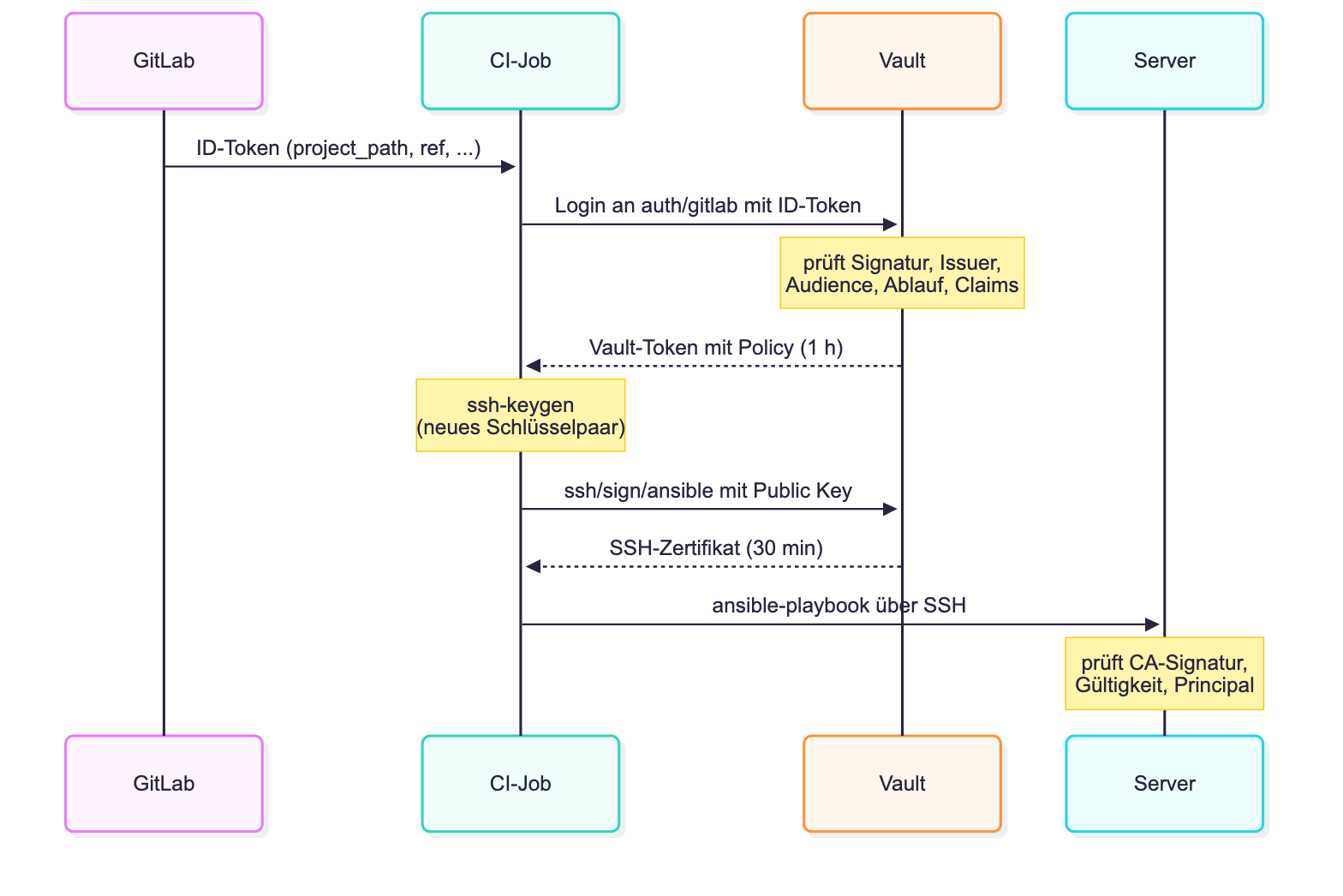
The private key is generated within the job and never leaves it. Vault only sees the public key, GitLab neither. No secret for server access is stored in GitLab itself. Whether a job receives access is decided by Vault based on the information in the ID token, not by the pipeline definition, which can ultimately be changed in any branch.
Setup
For the following examples, we assume an existing GitLab instance with runners and Vault. The Community Edition of GitLab is sufficient. Vault must be able to reach GitLab’s OIDC discovery URL, and the runner jobs must be able to reach Vault. In addition, an audit device should be activated in Vault so that every login and signature is logged. We use gitlab.example.com, vault.example.com, the project infra/ansible and the server user ansible as names.
For clarity, we set up Vault here with the vault CLI. In a GitOps setup, it is of course advisable to maintain this configuration in the repository and deploy it via the pipeline with Ansible or Terraform/OpenTofu.
Connecting GitLab and Vault
GitLab acts as an OIDC provider for CI jobs. The ID tokens are signed with a GitLab key, and GitLab publishes the associated public keys under /.well-known/openid-configuration. Vault therefore does not need to share a secret with GitLab, but merely needs to know which issuer to trust:
$ vault auth enable -path=gitlab jwt
Success! Enabled jwt auth method at: gitlab/

$ vault write auth/gitlab/config \
    oidc_discovery_url=https://gitlab.example.com \
    bound_issuer=https://gitlab.example.com
Success! Data written to: auth/gitlab/config
Via oidc_discovery_url, Vault retrieves GitLab’s signing keys, bound_issuer ensures that only tokens from this exact issuer are accepted. The path gitlab is freely selectable. It will later appear in the login path and in the name of the Vault tokens.
The content of the ID token becomes interesting. Decoded, the payload of a token for a job on main looks like this (abbreviated):
{
  "iss": "https://gitlab.example.com",
  "aud": "https://vault.example.com",
  "sub": "project_path:infra/ansible:ref_type:branch:ref:main",
  "iat": 1760890441,
  "nbf": 1760890436,
  "exp": 1760894041,
  "project_path": "infra/ansible",
  "ref": "main",
  "ref_type": "branch",
  "ref_protected": "true",
  "pipeline_source": "push",
  "user_login": "jdoe",
  "job_id": "4711",
  "ci_config_ref_uri": "gitlab.example.com/infra/ansible//.gitlab-ci.yml@refs/heads/main"
}
In addition to the standard claims iss, aud, sub and the timestamps, we find the interesting claims project_path, ref, ref_type and ref_protected. It is noticeable that ref_protected is transmitted as a string and not as a boolean. This is important later when configuring the Vault role. Furthermore, other claims such as pipeline_source, user_login, environment or ci_config_ref_uri are available.
Setting up the SSH CA
Vault’s SSH Secrets Engine can act as a Certificate Authority. It signs public SSH keys and generates OpenSSH certificates from them. We let Vault itself generate the CA’s signing key, so the private part never leaves Vault:
$ vault secrets enable ssh
Success! Enabled the ssh secrets engine at: ssh/

$ vault write ssh/config/ca generate_signing_key=true key_type=ssh-ed25519
Key           Value
---           -----
public_key    ssh-ed25519 AAAAC3NzaC1lZDI1NTE5AAAA...
Vault also provides the CA’s public key without authentication. We will need it later on the servers:
$ curl https://vault.example.com/v1/ssh/public_key
ssh-ed25519 AAAAC3NzaC1lZDI1NTE5AAAA...
We define which certificates the CA issues via a role:
$ vault write ssh/roles/ansible - <<'EOF'
{
  "key_type": "ca",
  "allow_user_certificates": true,
  "allowed_users": "ansible",
  "default_user": "ansible",
  "allowed_extensions": "permit-pty",
  "default_extensions": {"permit-pty": ""},
  "ttl": "30m",
  "max_ttl": "1h"
}
EOF
Success! Data written to: ssh/roles/ansible
The role is structured as follows: it issues only user certificates, and only for the principal ansible. Only permit-pty is set as an extension. Port, agent, and X11 forwarding are not possible with this in the certificate. A certificate is valid for 30 minutes by default, and a maximum of one hour upon request. If a client tries to deviate from this, Vault rejects the request:
$ vault write ssh/sign/ansible public_key=@id_ed25519.pub valid_principals=root
…
* root is not a valid value for valid_principals

$ vault write ssh/sign/ansible public_key=@id_ed25519.pub ttl=2h
…
* ttl is larger than maximum allowed 3600
Optionally, the Key ID in the certificate can be influenced via key_id_format. Without further configuration, it contains a hash of the Vault token (vault-token-<hash>). With key_id_format='{{token_display_name}}', after a login via our JWT authentication method, it will instead show gitlab-infra/ansible. Since sshd logs the Key ID with every login, this is significantly more informative in the log.
Additionally, the certificate can be bound to the source IP. Via the Critical Option source-address, sshd accepts the certificate only from the specified addresses, in our case those of the runners. A compromised certificate is thus worthless outside this network. For this, we add the following entries to the role:
  "default_critical_options": {"source-address": "192.0.2.0/24"},
  "allowed_critical_options": "verify-required"
The second entry seems a bit strange at first glance, but it is important. allowed_critical_options defines which Critical Options a client is allowed to set in its signature request. An empty list does not mean “none”, but “all”.
This implies two things: source-address must under no circumstances be in this list, otherwise the client could overwrite the default value in its request, for example with 0.0.0.0/0. However, the list must not remain empty either. So we need to find another harmless option that we allow as the only one, so to speak, as a placeholder. verify-required is suitable for this: the option requires user confirmation for FIDO keys, for example via PIN, and can at most further restrict a certificate.
If a client now tries to set source-address itself, Vault rejects the request with critical options not on allowed list: [source-address]. Vault still sets the default value from default_critical_options. A login from a different address is acknowledged by sshd with Refused by certificate options.
Policies and Roles
Who is allowed to do what is governed by two things in Vault: a role of the JWT authentication method defines which jobs are allowed to log in and which policies they receive. The policy, in turn, determines what the issued Vault token is allowed to do. For runs against the servers, the right to sign via our SSH role is sufficient:
$ cat ansible-apply.hcl
path "ssh/sign/ansible" {
  capabilities = ["update"]
}
path "kv/data/ansible/*" {
  capabilities = ["read"]
}

$ vault policy write ansible-apply ansible-apply.hcl
Success! Uploaded policy: ansible-apply
The second block additionally allows reading secrets for the playbooks from the KV engine. The same login could therefore also provide further secrets.
More interesting is the role, because here we bind the login to the project and branch:
$ vault write auth/gitlab/role/ansible-apply - <<'EOF'
{
  "role_type": "jwt",
  "user_claim": "project_path",
  "bound_audiences": ["https://vault.example.com"],
  "bound_claims_type": "string",
  "bound_claims": {
    "project_path": "infra/ansible",
    "ref": "main",
    "ref_type": "branch",
    "ref_protected": "true"
  },
  "token_policies": ["ansible-apply"],
  "token_ttl": "1h",
  "token_max_ttl": "1h"
}
EOF
Success! Data written to: auth/gitlab/role/ansible-apply
bound_audiences defines for which recipient a token must be issued. The job determines the value when requesting the ID token via the parameter aud under id_tokens in the .gitlab-ci.yml (see section “Pipeline”), and GitLab adopts it as claim aud in the token. Usually, this is the URL of the service that validates the token, here https://vault.example.com. Vault only accepts tokens whose aud matches one of the values in bound_audiences. A token that a job requested for another service cannot therefore be used with Vault. The actual conditions are in bound_claims, where all must apply. A job from a feature branch or from an unprotected main will accordingly fail during login:
* error validating claims: claim "ref" does not match any associated bound claim values
* error validating claims: claim "ref_protected" does not match any associated bound claim values
Especially ref_protected is crucial here. Since GitLab transmits the value as a string, it also appears as "true" in quotation marks in the role. Only then does GitLab’s branch protection, i.e., the question of who is allowed to push and merge to main, also apply to server access. If more flexible rules are needed, bound_claims_type=glob can also be used for patterns like release/* or additional claims such as pipeline_source can be added.
The source IP can also be restricted during login. With "token_bound_cidrs": ["192.0.2.0/24"] in the role, Vault only accepts logins from the runner network (otherwise permission denied), and the issued token is also only usable from there. If Vault is behind a load balancer or reverse proxy, Vault must know the real client address, for example via x_forwarded_for_authorized_addrs in the listener.
In practice, a gradation into several roles has proven effective. Merge requests receive read-only access via a role ansible-preview, which is only bound to project_path, but no SSH certificates. The roles ansible-check for the check run and ansible-apply for the actual deployment are both bound to the protected main and differ only in their policies.
One thing should be clear: even Ansible’s check mode logs in to the servers and uses sudo. There is no such thing as “read-only” SSH access. Any role that allows ssh/sign/ansible effectively means root access and must be strictly bound accordingly.
Preparing the Server
Three things are needed on the servers, which can sensibly be rolled out with Ansible itself. First, we store the public key of the CA in /etc/ssh/trusted_user_ca_keys and add the sshd_config:
TrustedUserCAKeys /etc/ssh/trusted_user_ca_keys
AuthorizedPrincipalsFile /etc/ssh/auth_principals/%u
AllowUsers admin ansible
TrustedUserCAKeys allows certificates from this CA. AuthorizedPrincipalsFile is also important here: without this option, sshd accepts a certificate for any local user whose name is listed as a principal in the certificate. With this option, each user requires their own file with the principals allowed for them. Users without this file cannot log in via certificate.
Then we create the user ansible as a system user without a password and without authorized_keys, and give him a principals file and sudo rights:
# cat /etc/ssh/auth_principals/ansible
ansible

# cat /etc/sudoers.d/ansible
ansible ALL=(ALL:ALL) NOPASSWD:ALL
A login as ansible is thus only possible with a valid certificate from our CA. sshd logs the Key ID, serial number, and CA of the certificate (here with key_id_format as described above):
Accepted publickey for ansible from 192.0.2.10 port 51945 ssh2: ED25519-CERT SHA256:… ID gitlab-infra/ansible (serial 17651805833285797696) CA ED25519 SHA256:…If the principal is missing, the certificate is rejected with Certificate does not contain an authorized principal. To revoke a pipeline’s access to a server, it is therefore sufficient to remove the principals file there.
There is one catch: a new server does not yet know the CA. The first run, which rolls out the CA key, user, and sshd configuration, therefore requires a different access, for example, an admin user with their own key.
Pipeline
In the .gitlab-ci.yml, we combine the necessary steps into a template from which all jobs that run against the servers inherit:
.ansible-run:
  id_tokens:
    VAULT_ID_TOKEN:
      aud: https://vault.example.com
  variables:
    VAULT_ADDR: https://vault.example.com
    ANSIBLE_HOST_KEY_CHECKING: "true"
    ANSIBLE_SSH_ARGS: >-
      -o ControlMaster=auto -o ControlPersist=60s
      -o UserKnownHostsFile=$CI_PROJECT_DIR/ci/known_hosts
      -o StrictHostKeyChecking=yes
  before_script:
    - export VAULT_TOKEN="$(vault write -field=token auth/gitlab/login role="$VAULT_ROLE" jwt="$VAULT_ID_TOKEN")"
    - mkdir -p -m 700 ~/.ssh
    - ssh-keygen -q -t ed25519 -N "" -f ~/.ssh/id_ed25519
    - vault write -field=signed_key ssh/sign/ansible public_key=@"$HOME/.ssh/id_ed25519.pub" > ~/.ssh/id_ed25519-cert.pub
Via id_tokens, the job requests an ID token with our audience from GitLab, which is then available in the variable VAULT_ID_TOKEN. With this, the job logs in to Vault, generates a new key pair, and has the public key signed. We store the certificate as id_ed25519-cert.pub next to the key, where OpenSSH finds it without further configuration. A look at the certificate shows the result:
$ ssh-keygen -L -f ~/.ssh/id_ed25519-cert.pub
/root/.ssh/id_ed25519-cert.pub:
        Type: ssh-ed25519-cert-v01@openssh.com user certificate
        Public key: ED25519-CERT SHA256:BSJp788v7wl/esKJl6i95GRWmCa/fEvKVJCJ/Wbrc/c
        Signing CA: ED25519 SHA256:/6RfVwCFNt+8ljufeokhOH/ZLq+USJn2DarRocTfg2s (using ssh-ed25519)
        Key ID: "vault-token-052269efcf2fef097f7ac28997a8bde464569826bf7c4bca549089fd66eb73f7"
        Serial: 17651805833285797696
        Valid: from 2026-10-19T18:34:41 to 2026-10-19T19:05:11
        Principals:
                ansible
        Critical Options: (none)
        Extensions:
                permit-pty
Equally important is the opposite direction: the job should also not blindly trust its counterparts. We therefore store the host keys of the servers in ci/known_hosts in the repository and enforce their verification with StrictHostKeyChecking=yes. The TLS connection to Vault is checked against the CA of the Vault certificate, and for an internal CA via VAULT_CACERT.
The actual jobs then only differ in the Vault role and their rules:
preview:                # Merge Requests: nur Vorschau, kein Serverzugang
  extends: .ansible-run
  variables: {VAULT_ROLE: ansible-preview}
  rules:
    - if: $CI_PIPELINE_SOURCE == "merge_request_event"

check:                  # main und nächtlicher Zeitplan: --check --diff
  extends: .ansible-run
  variables: {VAULT_ROLE: ansible-check}
  rules:
    - if: $CI_PIPELINE_SOURCE == "schedule"
    - if: $CI_COMMIT_BRANCH == $CI_DEFAULT_BRANCH

apply:                  # main, manuell gestartet
  extends: .ansible-run
  variables: {VAULT_ROLE: ansible-apply}
  resource_group: production
  rules:
    - if: $CI_PIPELINE_SOURCE == "push" && $CI_COMMIT_BRANCH == $CI_DEFAULT_BRANCH
      when: manual
In the preview job, key generation and signature are omitted; the policy would deny them anyway. The script sections with the actual ansible-playbook calls have been omitted for clarity. resource_group ensures that no two apply runs work against the servers simultaneously.
At this point, a closer look at the role of the rules is worthwhile. They merely control when a job is generated at all. The actual security boundary lies in Vault: if someone in a feature branch changes the pipeline definition so that a job requests the role ansible-apply, the login will fail due to the bound_claims.
Overall picture
If we summarize the individual parts, a chain of trust emerges in which each link verifies the previous one. GitLab signs the ID token, Vault verifies the signature, issuer, audience, validity, and claims. Only if all conditions are met does the job receive a Vault token with a policy that allows signing. The SSH CA signs the key with a fixed principal, limited validity, and restricted extensions. sshd finally verifies the certificate against the stored CA and the principals file, AllowUsers and sudoers handle the rest.
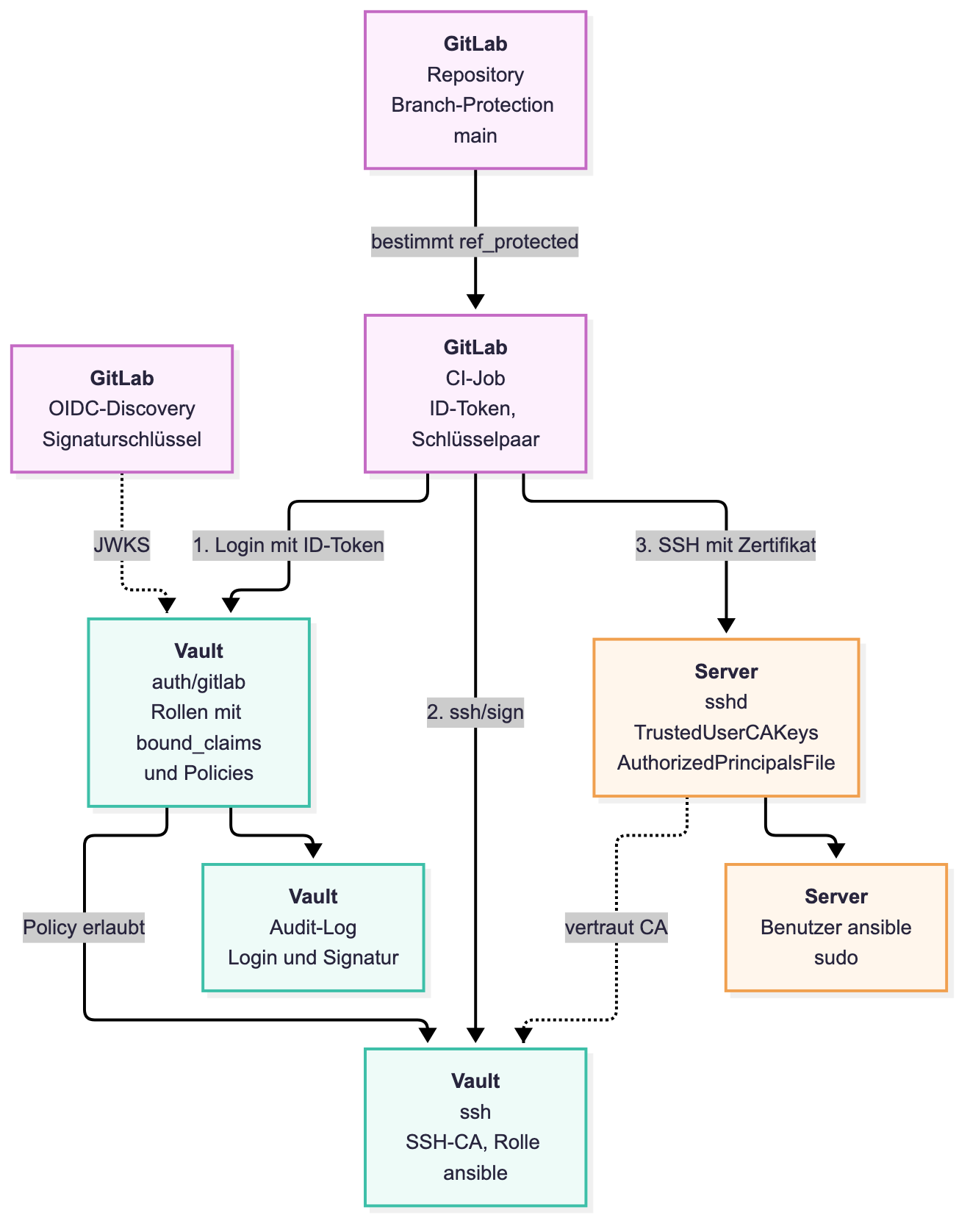
Who receives access is thus determined by branch protection in GitLab and the bound_claims in Vault. What the access allows is governed by policy, SSH role, principals file, and sudo. How long it is valid is determined by the TTLs of the Vault token and certificate. Logging occurs at three points: in Vault’s audit log, in the job log, and in the log of sshd on the server.
Conclusion
As shown, the static deploy key can be replaced with short-lived certificates with manageable effort: a JWT authentication method, an SSH CA with a suitable role, some policies, a few lines in the sshd_config and a few lines in the pipeline.
The advantages are obvious. There is no longer a long-lived secret in GitLab that could be lost or would need to be rotated. Each job generates its own key, and a certificate becomes worthless after 30 minutes at the latest. Forgotten copies of a key that are still in use somewhere can no longer exist. Access is tied to verifiable properties of the job: feature branches and merge requests do not receive a certificate, even with a modified pipeline definition. Via Vault’s audit log and the serial number and Key ID in the server logs, each login can be assigned to a job. Through roles and policies, it is also possible to finely differentiate who only receives a preview and who is allowed to deploy. And last but not least, the entire configuration can be maintained as code in the repository.
Unfortunately, there are also disadvantages. If Vault cannot be reached or is unable to sign SSH keys (sealed, etc.), the pipeline will also not run. A second access for emergencies therefore remains necessary. In addition, the security boundary shifts. Anyone who receives signatures from the SSH CA has root on all servers. This therefore applies to anyone who is allowed to push or merge to main. Branch protection in GitLab and the policies in Vault thus become security-critical.
Individual certificates cannot be revoked without an additional Key Revocation List, but the short validity period limits the risk. This validity period, conversely, also limits the duration of a run, because sshd checks the certificate with every new connection establishment, for example after a reboot. If the apply job is also allowed to write the Vault configuration itself, its Vault token is effectively an admin access to Vault for the duration of the job. In addition, there is the bootstrapping of new servers, the maintenance of host keys in the repository, and simply more moving parts. Errors often manifest only as Permission denied (publickey); here, ssh-keygen -L in the job and the log of sshd on the server help.
There is also potential for expansion: host certificates from Vault could replace the pinned host keys.
All in all, for us the advantages clearly outweigh the disadvantages. Instead of a key that was created at some point and has been valid everywhere ever since, there is access that is generated per job in a traceable way and expires on its own.
Everything we have shown in this post with Vault applies equally to OpenBao; the CLI there is simply called bao. The open-source fork of Vault is being developed under the umbrella of the OpenSSF of the Linux Foundation.
If you need support using Ansible, GitLab, or Vault, our Open Source Support Center is available to you.
| Categories: | Ansible Automation |
|---|---|
| Tags: | Ansible Gitlab |
| AI Disclosure: | This content was created with AI assistance. |
About the author
Adrian Vondendriesch
Technischer Leiter
about the person
Adrian has been an employee of credativ GmbH since 2013. As technical lead of the Cloud Infrastructure team, he is primarily involved in the planning, implementation, and support of distributed infrastructures such as Kubernetes and Ceph, as well as the development of deployment strategies. Previously, he was part of the database team at credativ, where he was responsible for the setup and management of high-availability database systems, among other things. Since 2015, he has been an active participant in the Debian project.